LivePerson built its reputation as an enterprise conversational AI platform over two decades, powering customer messaging for some of the world’s largest brands. The company processes billions of conversations annually through its Conversational Cloud, helping organizations shift from traditional call centers toward messaging-first support.
Yet a growing number of organizations are actively searching for alternatives. User reviews on G2 highlight several recurring frustrations: expensive pricing that catches many off guard, limited reporting customization, a steep learning curve, and customer support that doesn’t always meet expectations.
The platform’s enterprise focus also means smaller teams often find themselves paying for capabilities they’ll never use.
These pain points push many companies toward platforms that offer clearer pricing, simpler deployment, or better alignment with specific industry needs. The customer engagement space has matured significantly in the last 20 years, and several mature alternatives now compete effectively with LivePerson across different use cases.
If you’re evaluating your options, here are the seven best alternatives to LivePerson in 2026.
The 7 Best Alternatives to LivePerson in 2026
Each platform below serves different needs. Some excel at enterprise-scale contact center operations, others focus on e-commerce chat, and a few prioritize simplicity over feature depth. Here’s what you need to know about each option.
1. Comm100
Comm100 stands out as the most direct LivePerson competitor for organizations that need enterprise capabilities without the complexity. The platform combines AI automation with human support across every major channel, and it does so with pricing that doesn’t require a dedicated procurement team to understand.
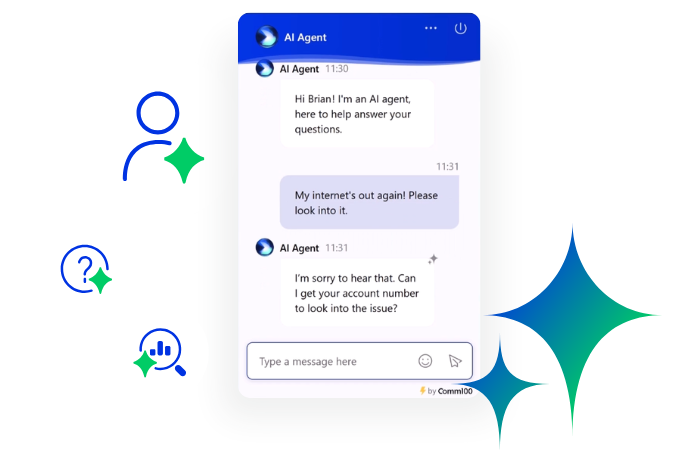
Where LivePerson requires custom quotes and lengthy sales cycles, Comm100 publishes its pricing structure upfront. The Comm100 AI Agent includes 37,500 AI replies by default (add-ons also available), letting teams scale automation without the per-resolution fees that plague some competitors. For organizations handling high volumes, this predictability matters.
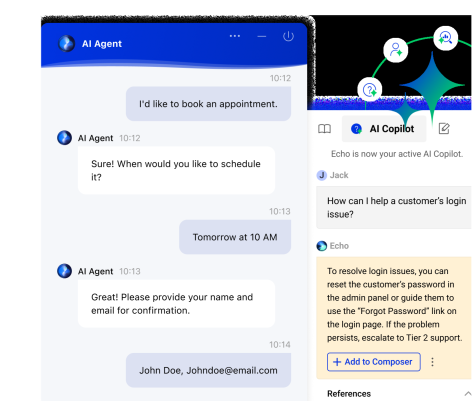
The AI product suite extends well beyond basic AI chatbots. AI Copilot assists human agents by drafting responses, summarizing conversations, and retrieving knowledge instantly. AI Insights analyzes conversations to surface trends and coaching opportunities.
The platform serves several regulated industries particularly well. Higher education institutions like McMaster University and San Jose State University use Comm100 to support students across admissions, financial aid, and IT help desks.
Gaming operators rely on the platform for VIP management and responsible gambling compliance. Government agencies, credit unions, and healthcare organizations choose Comm100 for its comprehensive security certifications: SOC 2 Type II, ISO 27001, PCI DSS, HIPAA, and GDPR compliance.
Pros
- Comprehensive AI suite with 12 integrated tools covering the entire support lifecycle
- 24/7 dedicated account managers included with every subscription
- Transparent pricing without per-resolution AI fees
- Purpose-built for regulated industries including gaming, healthcare, and government
- On-premises deployment option for organizations with data sovereignty requirements
Cons
- Reporting customization could be more flexible
- Agent console has fewer customization options than some competitors
See Comm100 in Action
Watch a short demo to see how Comm100 combines AI automation, omnichannel support, and transparent pricing to deliver a smarter alternative to LivePerson.
Watch the demo
View Demo
2. Zendesk
Zendesk dominates the help desk category with a platform that handles massive ticket volumes across global support operations. The company has been building customer service software for over 15 years, and that experience shows in the depth of its ticketing system.
The Suite plans start at $55 per agent monthly for Suite Team, scaling to $115 for Suite Professional and $169 for Suite Enterprise. At these tiers, you get omnichannel support across email, chat, phone, and social media from a unified agent workspace. The platform’s trigger and automation system can route tickets based on virtually any criteria, though mastering it requires significant investment.
Where Zendesk gets complicated is in its add-ons. Advanced AI costs an additional $50 per agent monthly. Quality Assurance runs $35 per agent. Workforce Management adds another $25. A team that starts on Suite Team thinking they’re getting a budget-friendly help desk often discovers their actual monthly spend climbing to $130 or more per agent once they add the features they actually need.
For large enterprises with dedicated IT resources and substantial budgets, Zendesk’s depth justifies the complexity. The marketplace offers thousands of integrations, and the platform’s reporting capabilities satisfy even the most data-hungry operations teams.
Smaller organizations or those in specialized industries often find themselves building custom solutions on top of Zendesk rather than finding ready-made capabilities.
Pros
- Extensive marketplace with thousands of third-party integrations
- Powerful automation through triggers, macros, and business rules
- Strong brand recognition and established market presence
- Robust API supports complex custom integrations
Cons
- Actual costs often run 2-3x the advertised base price once add-ons are included
- Steep learning curve with a complex admin interface
- AI and QA features require expensive separate purchases
- Per-agent pricing becomes expensive as teams scale
See how Comm100 compares to Zendesk →
3. Intercom
Intercom pioneered the in-app messaging category and continues to evolve as an AI-first customer service platform. The company’s Fin AI Agent has become central to its positioning, promising to resolve customer conversations automatically across chat and email channels.
The platform offers three tiers: Essential at $29 per seat monthly, Advanced at $85, and Expert at $132. These prices are competitive at first glance. The catch arrives with Fin AI Agent, which costs $0.99 per resolution on top of your seat fees.
Intercom claims an average 60% resolution rate, which sounds impressive until you calculate the math: 2,000 AI resolutions in a month adds $1,980 to your bill.
For product-led SaaS companies that want sophisticated in-app messaging, onboarding flows, and behavioral targeting, Intercom is a solid choice. The platform excels at engaging users during their product journey with contextual messages, product tours, and targeted campaigns. The messenger widget looks modern and integrates naturally into web and mobile applications.
The per-resolution pricing model creates unpredictable costs that worry finance teams. Usage-based billing for SMS, WhatsApp, and phone support adds more variables. Organizations looking for cost predictability often struggle with Intercom’s pricing structure, particularly as AI adoption drives resolution volumes higher.
Pros
- Modern, polished messenger widget with excellent in-app experience
- Strong product tour and onboarding capabilities
- Fin AI Agent achieves high resolution rates for many organizations
- Early Stage program offers 90% discount for qualifying startups
Cons
- Per-resolution AI pricing ($0.99 each) creates unpredictable monthly costs
- Additional usage fees for SMS, WhatsApp, and phone channels
- AI Copilot costs an extra $35 per agent monthly
- Some users report slow customer support response times
See how Comm100 compares to Intercom →
4. Genesys Cloud CX
Genesys Cloud CX targets enterprise contact centers that need sophisticated voice and digital channel orchestration. The platform serves over 4,800 organizations across 100+ countries, with strength in complex, multi-site deployments that require advanced routing, workforce management, and speech analytics.
The platform shines in scenarios where voice remains the dominant channel. Its IVR builder uses drag-and-drop interfaces that contact center managers can modify without engineering support. Predictive routing uses AI to match customers with agents based on predicted outcomes, not just skill matching. For organizations running traditional call centers looking to modernize, Genesys provides a clear migration path.
Pricing reflects its enterprise positioning. Cloud CX 1 starts at $75 per user monthly for voice-only functionality. Cloud CX 2 at $115 adds digital channels including email, chat, and social messaging. Cloud CX 3 at $155 includes workforce engagement management with forecasting, scheduling, and quality management. An AI Experience add-on starts at $40 monthly.
That enterprise focus creates barriers for smaller teams. The minimum viable deployment requires substantial investment, and the platform’s complexity demands trained administrators. Organizations primarily needing chat or messaging support often find themselves paying for voice capabilities they won’t use.
Pros
- Industry-leading voice capabilities with advanced IVR and speech analytics
- Comprehensive workforce engagement management built in at CX 3 tier
- 99.996% uptime with strong reliability track record
- Extensive AppFoundry marketplace with pre-built integrations
Cons
- Starting price of $75 per user is too expensive for smaller teams
- AI features require additional fees beyond base subscription
- Steep learning curve for administrators
- Digital-only teams pay for voice infrastructure they may not need
5. LiveChat
LiveChat has focused on one thing since 2002: making live chat work well for businesses of all sizes. The Poland-based company reported approximately $87.5 million in trailing twelve-month revenue as of 2024, built largely on a reputation for reliability and ease of use.
What sets LiveChat apart is its simplicity. New agents can be productive within hours, not days. The interface feels familiar to anyone who’s used modern messaging apps. For organizations that primarily need human-powered chat support without complex AI automation, LiveChat delivers the fundamentals exceptionally well.
The limitation is scope. LiveChat is exactly what its name suggests: live chat. If you need email ticketing, you’ll buy HelpDesk (a separate product). AI chatbots require ChatBot (another separate product at $52 monthly). For teams wanting an all-in-one platform, this modular approach means managing multiple subscriptions and interfaces.
The platform offers four tiers: Starter at $20 per agent monthly (billed annually), Team at $41, Business at $59, and Enterprise with custom pricing. Even at the Starter level, you get unlimited chats, chat history, and basic customization. The Team and Business plans unlock features like scheduled reporting, agent performance dashboards, and advanced routing rules.
Pros
- Extremely easy to deploy and use with minimal training required
- Reliable performance with 22+ years of operational experience
- Competitive per-agent pricing without complex add-on structures
- Strong mobile apps for agent flexibility
Cons
- AI chatbots and email ticketing require separate product purchases
- Limited to live chat without integrated omnichannel capabilities
- No free plan available (only 14-day trial)
- Customer support primarily available through chat, which some users find frustrating
6. Tidio
Tidio targets small businesses and e-commerce stores that want to add chat and basic automation to their websites quickly. The platform has grown to serve over 300,000 businesses worldwide, with particularly strong integrations for Shopify, WordPress, and WooCommerce.
For Shopify merchants, Tidio integrates well. You can see what products visitors are viewing, recommend items based on browsing behavior, and trigger discount offers to prevent cart abandonment.
The visual chatbot builder lets non-technical users create conversation flows without writing code. Lyro AI can answer product questions, check order status, and handle common inquiries automatically.
The free plan includes up to 50 conversations monthly with live chat and basic chatbot capabilities. Paid plans start with Starter at $29 monthly, scaling to Growth at $59 and beyond.
What makes Tidio’s pricing confusing is its conversation-based billing and separate add-on products. Lyro, their AI agent, starts at $39 monthly for 50 AI conversations. Flow automation adds another $29 for 2,000 visitor triggers.
The platform works best for teams with straightforward needs and lower volumes. Once conversation counts climb, Tidio’s pricing becomes less competitive. The need to purchase AI and automation features separately means total costs can surprise businesses that started on the free plan expecting simple upgrades.
Pros
- Free plan available for small teams with low volumes
- Excellent Shopify and e-commerce platform integrations
- Visual chatbot builder requires no coding knowledge
- Quick setup (can be running in minutes)
Cons
- Conversation-based billing creates unpredictable costs as volume grows
- AI agent and automation features sold as separate add-ons
- Limited to 10 agents across all plans except custom tiers
- Mobile app performance has mixed reviews
7. HubSpot Service Hub
HubSpot Service Hub makes strategic sense in one specific context: you’re already running HubSpot’s CRM, Marketing Hub, or Sales Hub. The platform shares customer data seamlessly across products, creating unified profiles that follow contacts from first website visit through purchase and into support interactions.
For HubSpot ecosystem customers, the integration value is real. Sales reps see support tickets in their deal records. Support agents access complete marketing engagement history. Customer success teams can identify at-risk accounts based on support patterns. This connected view eliminates the data silos that plague organizations using multiple disconnected tools.
Outside the HubSpot ecosystem, Service Hub loses much of its appeal. The platform assumes HubSpot data structures and workflows. Teams evaluating it as a standalone customer service solution discover quickly that it’s designed as part of a larger whole rather than a best-in-class independent product. The jump from Starter to Professional represents a significant cost increase that catches many organizations off guard.
The free tier includes basic ticketing, a shared inbox, live chat, and simple contact management. Starter costs $15 per seat monthly and removes HubSpot branding while adding conversation routing. Professional jumps to $90 per seat (with a $1,500 one-time onboarding fee) and unlocks SLA management, customer feedback tools, and knowledge base capabilities. Enterprise at $150 per seat adds advanced permissions and AI agents.
Pros
- Seamless integration with HubSpot CRM, Marketing, and Sales Hubs
- Free tier available for basic ticketing and chat
- Unified customer view across marketing, sales, and service
- Familiar interface for existing HubSpot users
Cons
- Essential features like SLA management and knowledge base locked behind $90 Professional tier
- One-time onboarding fees ($1,500-$3,500) add to implementation costs
- Limited value as standalone product outside HubSpot ecosystem
- WhatsApp and Microsoft Teams support is limited or requires workarounds
What Is the Best Alternative to LivePerson?
Comm100 stands out as the best alternative to LivePerson for organizations that want enterprise capabilities without enterprise complexity. The platform delivers transparent pricing without per-resolution fees, comprehensive AI tools integrated from the start, and dedicated support that larger platforms often reserve for their highest-paying customers.
The decision ultimately depends on your specific situation. If you’re already invested in the HubSpot ecosystem, Service Hub’s integration benefits may outweigh its limitations. If you run a Shopify store with simple chat needs, Tidio’s e-commerce focus makes it worth considering. For enterprise contact centers where voice remains dominant, Genesys Cloud CX delivers capabilities no other platform matches.
But for organizations in regulated industries like gaming, higher education, healthcare, or government, Comm100’s combination of compliance certifications, AI automation, and predictable pricing creates the strongest value proposition. The platform’s SOC 2 Type II, PCI DSS, HIPAA, and GDPR compliance aren’t add-ons; they’re built into the foundation.
From live chat to AI agents to AI-powered agent training, Comm100 provides a feature-rich support platform trusted by organizations worldwide. When you’re ready to stop paying premium prices for capabilities you don’t use and start investing in a platform designed for your actual needs, Comm100 deserves serious consideration.
See Why Comm100 Is the Best LivePerson Alternative
Talk to our experts to explore how Comm100 can replace LivePerson with predictable pricing, enterprise-grade AI, and built-in compliance tailored to your industry.
Watch the demo
Request Demo
Frequently Asked Questions
Why are companies switching away from LivePerson?
Common reasons include opaque pricing that requires sales calls to understand, high total cost of ownership once professional services is factored in, limited reporting customization, and customer support that users on G2 and TrustRadius describe as slow or unresponsive. The platform’s enterprise focus also means smaller teams pay for capabilities they don’t need.
What makes Comm100 different from other LivePerson alternatives?
Comm100 combines transparent pricing, included AI capabilities (37,500 replies without per-resolution fees), comprehensive compliance certifications, and dedicated account management. Unlike platforms that treat regulated industries as an afterthought, Comm100 was built specifically for sectors like gaming, healthcare, higher education, and government.
Which LivePerson alternative is best for small businesses?
For small businesses with simple needs, Tidio offers a free plan and e-commerce focus that works well for Shopify stores. LiveChat provides reliable chat-only functionality at competitive per-agent pricing. However, businesses expecting to scale should consider platforms like Comm100 that won’t require migration as complexity increases.