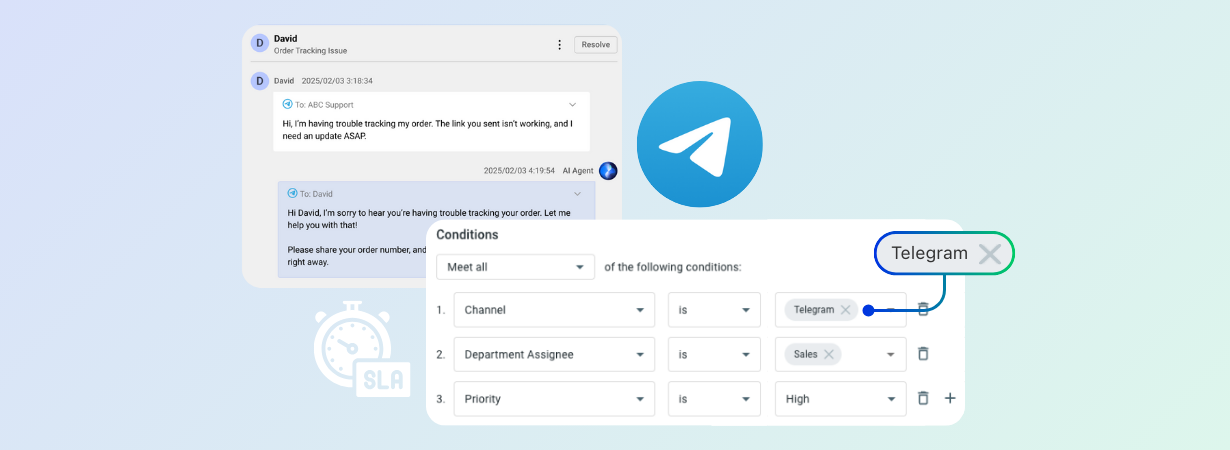
Telegram users expect instant responses. The platform’s real-time messaging culture creates customer expectations that align more with texting friends than traditional support channels, meaning delayed responses feel like being ignored, not queued.
This expectation clash creates a critical challenge for businesses: how do you maintain professional SLA commitments on a platform designed for immediate, casual communication?
Unlike email or web forms where customers understand processing delays, Telegram’s instant messaging environment makes every minute count toward customer satisfaction.
The stakes are higher than response times alone. SLA breaches on messaging platforms directly impact customer retention, brand perception, and competitive positioning.
When customers can easily switch to competitors who respond faster on the same platform, SLA compliance becomes a business-critical differentiator.
Traditional helpdesk approaches fail on Telegram because they weren’t designed for real-time messaging expectations.
Organizations need purpose-built tools that bridge the gap between casual messaging interfaces and professional support operations, maintaining the speed customers expect while ensuring no conversation falls through compliance cracks.
Here’s how Comm100 helps companies stay SLA compliant while delivering the rapid, responsive service that users on Telegram expect.
How Automated Ticketing Helps Improve Support on Telegram
Unlike native Telegram where messages can get buried in chat feeds, automated ticketing creates a permanent record with unique identifiers for every conversation. Whether an agent goes offline mid-conversation or customers return days later with follow-up questions, the complete interaction history remains accessible and actionable.
Complete Conversation Context
Agents inherit full chat history when tickets are assigned or transferred between team members. Previous troubleshooting attempts, customer preferences, and resolution progress carry forward automatically, eliminating the need for customers to repeat their issues or explain previous interactions.
Performance Review and Quality Assurance
Managers gain comprehensive oversight of Telegram support quality through ticket records that capture:
Response time accuracy for each interaction
Resolution effectiveness and customer outcome
Agent communication style and professionalism
Escalation patterns that indicate training opportunities
Workload Distribution Intelligence
The ticketing system tracks agent capacity in real-time, automatically routing new Telegram chats to available team members based on current ticket loads. This prevents overwhelming individual agents while ensuring consistent response times across all conversations.
Advanced tools like Comm100’s AI Agent can handle up to 80% of routine inquiries automatically, escalating to human agents only when required.
This intelligent filtering ensures agents focus on complex issues while maintaining complete visibility into all customer interactions.
SLA Compliance Automation
Each ticket carries automated SLA monitoring that tracks time-to-response and resolution progress. Supervisors receive alerts before SLA breaches occur, enabling proactive intervention rather than reactive damage control.
Modern AI customer service platforms offer sophisticated monitoring capabilities that distinguish between different channels, handling various interaction types, ensuring appropriate SLA timers for each conversation complexity level.
Searchable Resolution Database
Resolved tickets become searchable knowledge assets that help agents quickly identify solutions for similar issues. Instead of starting from scratch with each Telegram inquiry, agents can reference successful resolution patterns from previous conversations.
This knowledge base becomes particularly powerful when integrated with advanced AI customer service tools that can automatically suggest relevant solutions, offer text enhancement, and help agents with smart summaries to resolve issues faster.
Transform Customer Service with AI
See how Comm100 turns Telegram chats into SLA-compliant, trackable tickets. Schedule your personalized demo and experience AI-powered support in action.
How Comm100 Helps Support Teams Ensure SLA Compliance
Comm100’s SLA feature transforms Telegram conversations into trackable, time-bound commitments with automated monitoring and escalation capabilities:
1. Access the SLA Policy Tab
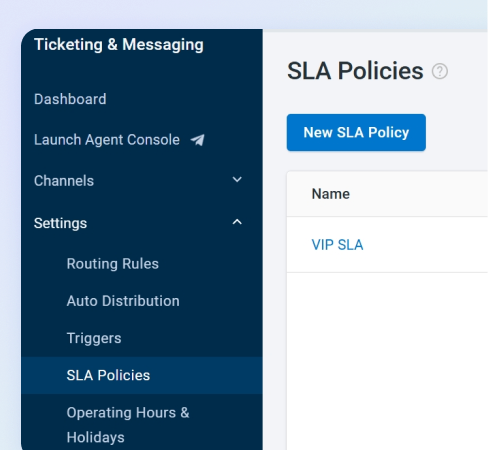
Log into your Comm100 Control Panel and navigate to Ticketing & Messaging in the left sidebar. From the Settings dropdown menu, select SLA Policies and click New SLA Policy to begin configuration.
This centralizes all your SLA management in one location, allowing you to create channel-specific policies that address Telegram’s unique response expectations.
2. Define your Telegram SLA Parameters
Create a dedicated policy for Telegram conversations by naming it clearly (e.g., “Telegram Instant Messaging SLA”) and enabling the toggle.
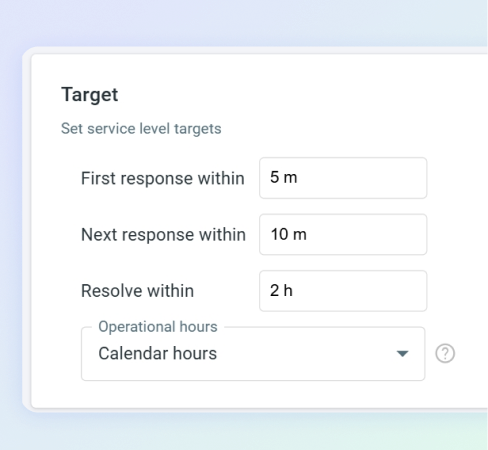
In the Target section, configure response times that align with messaging platform expectations. Ideally, you can go with the following:
First Response Time: 2-5 minutes maximum
Next Response Time: 3-7 minutes for follow-up communications
Resolution Time: 30 minutes to 2 hours depending on complexity
3. Choose Your Operating Hours Framework
Select between Calendar Hours or Operating Hours based on your Telegram support model:
Calendar Hours (24/7 Support)
Ideal if you promise round-the-clock Telegram assistance. The SLA clock runs continuously, matching customer expectations for always-available messaging support.
Operating Hours (Business Hours Only)
Choose this option if Telegram support operates within specific timeframes. Configure your working schedule under Ticketing & Messaging > Settings > Working Time & Holidays to pause SLA timers outside business hours.
4. Set Telegram-Specific Conditions
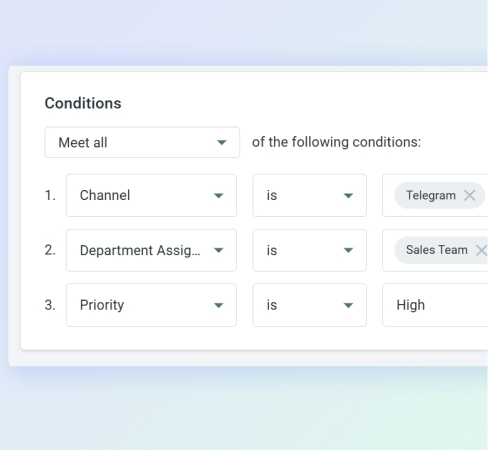
This step ensures your SLA policy only applies to Telegram conversations. Click into the Conditions section and configure filters that target messaging interactions specifically:
Channel: Select Telegram from available communication channels
Department Assignee: Choose your designated Telegram support team
Ticket Priority: Standard, urgent, or critical based on conversation urgency
These conditions prevent the policy from affecting tickets from other channels like Email, SMS, social media, and messaging channels.
5. Save and Activate Policy
Click Save to activate your Telegram SLA policy. The system immediately begins monitoring all qualifying conversations against your defined timeframes.
Important: If you create multiple SLA policies, Comm100 triggers them according to display order.
Ensure your most specific policies (like Telegram-only rules) appear before general policies to prevent conflicts.
6. Monitor SLA Performance
Once activated, your Telegram SLA policy automatically tracks compliance across all messaging conversations. The system provides comprehensive SLA reporting that breaks down performance by individual policies, departments, and agents, giving managers complete visibility into how well teams meet commitments across different channels.
Conclusion
Maintaining SLA compliance on Telegram requires more than good intentions and fast typing. The platform’s instant messaging culture demands professional support infrastructure that can match customer expectations for immediate responses while ensuring no conversation falls through operational cracks.
From automated ticket creation that captures every interaction to intelligent routing that balances agent workloads, the platform ensures your team consistently meets response commitments without sacrificing the personal, conversational experience customers expect.
Schedule your personalized demo and see why businesses choose professional support infrastructure over basic messaging apps for customer service excellence.
Transform Customer Service with AI
Schedule a personalized demo and see how Comm100’s AI platform can revolutionize your customer service.
Najam is the Content Marketing Manager at Comm100, with extensive experience in digital and content marketing. He specializes in helping SaaS businesses expand their digital footprint and measure content performance across various media platforms.