Companies spend an average of $4,100 per employee on onboarding, per a study by SHRM, yet only 12% of employees think their organization does a great job bringing them up to speed. For customer support teams, the stakes are even higher. New agents juggle complex product knowledge, communication protocols, compliance requirements, and customer expectations from day one.
The consequences of ineffective onboarding hit support operations hard. Twenty percent of employees quit within the first 45 days, forcing teams to restart the expensive hiring cycle while remaining agents absorb the overflow.
High turnover drives up training costs, reduces team knowledge retention, and damages customer experience metrics. Poor first call resolution rates and longer handle times become visible symptoms of undertrained staff.
AI automation addresses these challenges head-on. Based on a study from Deloitte, AI-driven onboarding reduces time-to-productivity by 50%, getting agents customer-ready faster while maintaining quality standards.
Nearly half of HR professionals now use AI in their onboarding processes, with adoption accelerating across customer service organizations. These tools handle everything from policy documentation and product training to real-time performance coaching and compliance certification.
The following ten platforms represent the most effective AI-powered solutions for automating support staff onboarding and training in 2026. Each offers distinct capabilities for different organizational needs, from enterprise contact centers to growing support teams.
The 10 Best AI Onboarding Tools for Automating Support Staff Onboarding in 2026
Before we go into extensive detail, here’s a quick comparison table:
Platform
Best For
Training Focus
AI Capabilities
Starting Price
Key Differentiator
Comm100 AI Training
Support-specific training
Live chat simulation, role-play scenarios
Instant scoring, feedback, knowledge gap analysis
$80/agent/
month
Only platform built specifically for support agent training
Docebo
Enterprises seeking AI-native learning
Employee, customer & partner training
AI-powered coaching, summarization, quizzes
Custom quote (typically $15K+/year - flat fee)
A comprehensive learning ecosystem
iSpring Learn
Organizations using PowerPoint
Converting presentations to courses
AI content assistance, translations, captions
$3.75/user/
month
PowerPoint integration with authoring toolkit
Connecteam
Frontline & deskless workers
Mobile-first employee training
AI course creator
Free up to 10 users, then $29/month (30 users)
100% mobile-optimized for non-desk workforce
Absorb LMS
Mid-large enterprises
Strategic multi-audience learning
Intelligent AI assist, intelligent course creation
Custom quote (contact sales)
AI content generation built in
TalentLMS
Small-mid sized businesses
Quick deployment training
AI test creation, course translation, AI Coach
$119/month (40 users)
Easy setup with TalentCraft AI authoring
LearnUpon
Mid-large organizations (400+ employees)
Dual employee & customer education
Limited AI features
$15,000/year minimum
Reliable customer support model
Arlo
Commercial training providers
Instructor-led & blended learning
AI course authoring
$179/month + usage fees
Training business management (CRM + LMS)
SkyPrep
Small-mid sized businesses
Cost-effective corporate training
AI content translations
Starting ~$349/month (100 users)
Active-user pricing model
360Learning
Collaborative learning teams
Peer-to-peer knowledge sharing
AI authoring tool, content generation
$8/user/
month (Team plan)
Collaborative learning with SME-led courses
1. Comm100 AI Onboarding
Comm100 AI Training stands alone as the only platform built specifically for customer support agent training. Unlike general HR onboarding tools (which we’ll also talk about), it focuses exclusively on preparing agents for live customer interactions through realistic simulations and immediate AI-powered feedback.
See Comm100 AI Onboarding in Action
See how Comm100 AI Onboarding helps shorten ramp times for your support agents.
The platform offers two core training modes designed to accelerate learning while reducing manager oversight. Chat Simulation creates an interactive practice environment where agents engage with AI-generated questions pulled directly from your knowledge base.
The system generates questions one by one, randomizing scenarios based on agent responses to simulate real customer conversations. Agents can experiment freely, testing different approaches without fear of real-time judgment or performance consequences.
After each response, agents receive detailed AI scoring alongside ideal answer examples and explanations. This private feedback loop allows agents to understand not just what they got wrong, but why the AI’s suggested response works better.
Each question card includes direct links to relevant knowledge base articles, enabling agents to dive deeper into topics where they need reinforcement. In regulated industries like gaming, this initial training could prove to be vital.
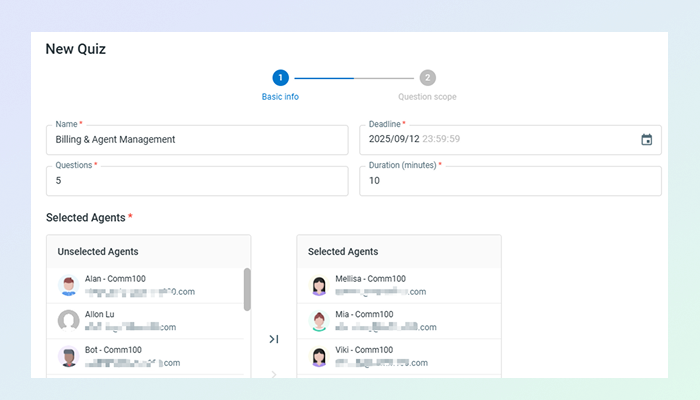
Structured Assessment transforms knowledge verification from manual quiz creation into an automated process. Managers define quiz parameters such as:
Name
Deadline
Number of questions (1-100)
Duration
Then, they select the knowledge base scope. The AI instantly generates comprehensive assessments covering the specified content.
Once the agents submit the quiz, the AI grades all responses and provides the same detailed feedback as simulations: agent answers, ideal responses, score explanations, and links to source documentation. It integrates with all popular knowledge bases: Comm100 Knowledge Base, Confluence, or ServiceNow, allowing organizations to test against their actual support documentation.
The manager dashboard provides comprehensive visibility into team readiness without requiring constant supervision. Managers can review simulation and quiz results to identify knowledge gaps across individuals or the entire team.
The system tracks completion rates, scores, and specific topic weaknesses, surfacing coaching opportunities that would otherwise remain hidden until agents made mistakes with actual customers.
Permission-based access controls allow organizations to designate quiz creators, restrict dashboard visibility, and manage which agents can view all assigned quizzes versus only their own. This flexibility supports both centralized training teams and distributed management structures.
Pros
Purpose-built for support staff training with realistic customer scenarios generated from your actual knowledge base
Instant AI scoring with detailed explanations eliminates manual evaluation time
Direct links from questions to KB articles enable self-directed learning
Automated quiz generation from 1-100 questions with customizable deadlines and duration
Integrates with multiple knowledge base platforms (Comm100 KB, Confluence, ServiceNow)
Private practice environment reduces new agent anxiety and encourages experimentation
Reduces manager time spent on training creation, assessment, and grading
Cons
Requires existing knowledge base content for optimal question generation
Focuses exclusively on support training
2. Docebo
Docebo positions itself as an AI-first learning platform that transformed from a traditional LMS into a comprehensive learning ecosystem. The platform offers an AI-first system with dynamic content generation, virtual coaching, use-case based instructional templates, and collaborative content design.
It’s pertinent to mention that Docebo isn’t exclusively designed for support staff training; it’s a more holistic learning management system that companies can adapt to their needs.
The platform incorporates LMS, LXP, content creation and authoring, learning content management, virtual classroom, gamification, microlearning, social and collaborative learning, communities, assessment and feedback, performance support, analytics and reporting, and mobile learning capabilities, many of which might not be suitable for training support staff.
Pricing remains a significant consideration. Docebo targets enterprise clients, and while the company doesn’t publish standard rates, implementations typically start at $15,000+ annually.
Pros
Leading AI innovation with comprehensive AI toolkit
Highly scalable infrastructure supporting millions of users
Extensive integration ecosystem (Salesforce, Microsoft Teams, Workday, etc.)
Docebo Communities feature for creating powerful learning communities
Cons
Steep learning curve for new administrators
Enterprise pricing may be prohibitive for smaller organizations
Some features require workarounds and use of clunky API
3. iSpring Learn
iSpring Learn combines a cloud-based LMS with the powerful iSpring Suite authoring toolkit, creating a unique solution for organizations that use PowerPoint. iSpring Suite is a PowerPoint-based eLearning authoring tool that turns slides into interactive, SCORM-compliant courses with quizzes, role-plays, and video lessons.
Since this is a standalone LMS that focuses on turning presentations into training sessions, you will have to integrate it with other tools if you want a fully AI-powered customer experience ecosystem. That means additional costs for businesses that need more features, such as AI Copilot support for their agents.
However, if you need a tool that can reliably convert PowerPoint slideshows into SCORM compliant HTML5 or MP4s for corporate compliance training, iSpring Learn is a good, albeit feature-limited, choice.
Pros
Easy, navigable interface with a simple learning curve
Quick course setup from existing PowerPoint content
ISO 27001 and ISO 27701 certified for security
Cons
No Mac desktop app available
Limited course library with just 7 standard and 39 premium courses
Integration options more limited than enterprise competitors
4. Connecteam
Connecteam stands out as the only fully mobile-first training platform designed specifically for deskless and frontline workers in industries like construction, healthcare, retail, and hospitality.
The platform goes beyond traditional LMS functionality to include workforce management features like scheduling, time tracking, and team communication, all optimized for mobile devices.
This integration makes Connecteam particularly valuable for organizations that need training capabilities alongside operational management tools. Rather than purchasing separate systems for training, scheduling, and communication, businesses can consolidate these functions into a single platform.
However, this all-in-one approach comes with tradeoffs. Features are spread across three different hubs — Operations, Communications, and HR & Skills — each with its own pricing tiers.
The mobile-first design philosophy means Connecteam excels at delivering bite-sized training content to smartphones but may feel limited for complex, desktop-oriented learning programs. Organizations requiring sophisticated course authoring, detailed learning paths, or extensive multimedia training may find the platform’s content creation tools too basic.
Pros
Free plan for teams up to 10 users with all features included
Perfect for frontline workers who primarily use mobile devices
Can block workers from shifts until they’ve completed specific training
Cons
No gamification features or standardized quizzes
Limited integration capabilities compared to other training solutions
Features spread across three hubs can become expensive if you need multiple
5. Absorb LMS
Absorb LMS is a market-leading AI-powered strategic learning system designed to deliver results for all learners; employees, partners, and customers alike. The platform excels at simplifying learning management while amplifying impact through automation and personalization.
The platform’s Absorb Skills feature deserves particular attention for organizations focused on upskilling initiatives. With over 20,000 courses spanning all industries and skill levels, plus expert-guidance and learner reporting, they have dedicated training sets available right out of the box.
However, Absorb’s power comes with complexity. The platform is described as too customizable, which can create a learning curve during setup, and new administrators often need several months to fully optimize their implementation.
The platform’s focus on enterprise clients means smaller organizations may find themselves paying for capabilities they don’t need or struggling to justify the investment.
While Absorb offers robust features for managing multiple audiences (employees, customers, partners), companies with simpler training needs might achieve better ROI with more streamlined, cost-effective alternatives.
Pros
A household name for enterprise learning
Excellent knowledge base with quality walkthroughs
Intuitive to use and difficult to break from an admin perspective
Cons
Steep learning curve
Implementation can take several months through trial and error
No publicly available pricing (custom quotes only)
6. TalentLMS
TalentLMS has invested heavily in AI-powered content creation through its TalentCraft tool. TalentCraft AI creates immersive content with AI content assistance, translations, and summaries, allowing learning and development (L&D) teams to build courses significantly faster than traditional authoring methods.
The AI course translation capability clones and translates entire courses in over 40 languages, making global training rollouts dramatically faster. Rather than manually recreating courses for different regions, companies can deploy localized versions within hours instead of weeks.
Beyond AI features, TalentLMS includes a built-in course library with 700+ ready-made courses covering compliance, soft skills, technical topics, and industry-specific training. This content library provides immediate training options while custom courses are being developed.
The platform’s gamification engine uses badges, points, and leaderboards to drive engagement, though organizations should consider whether competitive elements align with their learning culture.
Pros
Great balance between advanced functionality and ease of use
Transparent pricing structure with clear, upfront prices and no hidden costs
Free option for small teams with 5 users and 10 courses
Cons
Customer support for lower-tiered plans limited to email only
Limited CRM integrations (primarily Salesforce)
Custom reports feature only available on higher-tier Plus plan
7. LearnUpon
LearnUpon is a premium LMS designed for mid-sized to large organizations (400+ employees) that need both employee training and customer education capabilities.
Administrators can assemble courses by simply dragging content blocks, like videos, documents, SCORM files, and assessments into the desired sequence. The builder supports diverse content types including instructor-led training, webinars, and self-paced modules, allowing organizations to create blended learning experiences without coding knowledge.
However, this might be overkill for support staff as you want them training on specific information, like compliance documentation, industry regulations, or existing customer conversations.
The platform’s gamification features include customizable badges and leaderboards that can be configured to recognize course completion, assessment scores, or learning streak milestones.
Pros
Intuitive, easy-to-navigate user experience
Excellent for dual-purpose use (employee and customer training)
Strong automation capabilities
Cons
Best suited for organizations with 400+ employees, potentially overkill for smaller teams
Limited customization options for course design
Premium pricing model with add-ons
8. Arlo
Arlo is uniquely positioned as training management software specifically built for commercial training providers who sell courses. Unlike traditional LMS platforms, Arlo manages the commercial aspects of training including registrations, invoicing, and CRM alongside course delivery.
The course scheduling engine handles the complexity of managing multiple course formats simultaneously. Training providers can schedule the same course as face-to-face sessions in different cities, live online webinars, and self-paced eLearning.
The system automatically adjusts capacity limits, venue details, and delivery instructions based on format. Instructors can view their teaching schedules across all formats in unified calendars.
It also offers CRM features, and unlike generic CRMs that require customization for training operations, Arlo tracks training-specific data points: which courses each customer has completed, certification expiration dates, preferred learning formats, and purchase history.
Naturally, it’s designed more towards comprehensive learning as compared to standard support staff training. In essence, Arlo isn’t suitable for departmental training, but more for businesses that sell training as their core product.
Pros
Flexible hybrid pricing combining flat subscription ($179-$240/month per admin)
Handles multiple time zones automatically
Strong support for both public and private course delivery
Cons
Limited customization options
Basic reporting without in-depth data insights
Not ideal for internal-only corporate training
See Comm100 in Action
See how Comm100 unifies in-app messaging, live chat, AI automation, and omnichannel support to elevate player engagement and retention.
SkyPrep’s course creation system supports an unusually wide range of content formats. The platform accepts PowerPoints, PDFs, videos, and SCORM files, allowing organizations to repurpose existing training materials without reformatting or conversion.
The AI-powered automatic content translation feature enables global training deployment without hiring translation services.
Organizations can create courses in their primary language and let the AI generate versions in other languages, though human review remains advisable for technical or culturally sensitive content. This feature reduces the time and cost barrier for multinational training initiatives.
Seamless SSO integration streamlines user access by connecting with existing identity management systems. Employees can access training using the same credentials they use for other corporate systems, eliminating the need to remember separate usernames and passwords.
However, SkyPrep is mostly for companies that want to prioritize training and learning, as compared to those that are looking for a solution that’s dedicated and tailored for support teams.
Pros
Quick implementation with straightforward setup
Active-user pricing model where only first login counts toward limit
Clean learner-facing interface that’s easy to navigate
Cons
Analytics capabilities are quite limited
Limited integrations with third-party software like HR platforms and CRMs
Significantly limited assessment capabilities
10. 360Learning
360Learning takes a unique bottom-up approach where subject matter experts within organizations create and share knowledge. Unlike traditional LMS platforms where L&D teams create all content, 360Learning enables subject matter experts (SMEs) throughout the organization to build and share training.
The AI assists these non-professional instructional designers by suggesting course structures, generating assessment questions, and ensuring content follows learning best practices.
This is primarily an e-learning tool. For instance, organizations can create topic-specific or role-specific communities where employees share knowledge, discuss challenges, and collaboratively solve problems.
These communities integrate with formal learning paths, creating bridges between structured training and organic knowledge sharing. For example, a sales community might discuss emerging objection-handling techniques that later get formalized into official training modules.
Integration capabilities span HRIS systems (BambooHR, HiBob, Workday, SAP SuccessFactors), communication tools (Slack, Microsoft Teams), and content providers (LinkedIn Learning, Udemy Business, Coursera).
These integrations automate user provisioning, enable learning notifications in daily workflow tools, and expand content libraries beyond internally created courses. Naturally, this might be too much for companies that just need a solution for automating staff training and onboarding.
Pros
Entry price significantly lower than average SMB budget
Intuitive course creation with flexible content formats
Strong focus on collaborative, social learning
Cons
Navigation through densely clustered content pages can be challenging for learners
Platform lacks flexibility for complex training adaptations
Reporting capabilities are quite basic and inflexible with lack of customization
Making the Right Choice for Your Support Team
If you’re looking for the best e-learning tool for employees and support staff training, you can’t go wrong with Comm100 AI Onboarding. The other nine platforms that we’ve reviewed represent robust solutions for general workforce training across industries.
However, an important distinction exists between general learning management systems and platforms purpose-built for customer support training.
Generic LMS platforms teach through traditional methods: video lessons, document review, knowledge checks, and standard assessments. While effective for many training scenarios, these approaches fall short when preparing support agents for the unique challenges of live customer interactions.
Support staff training requires simulation of real-world scenarios that generic platforms cannot replicate. Contact center agents need practice handling frustrated customers, navigating complex product questions under pressure, and applying knowledge base information in dynamic conversations; not just memorizing it for multiple-choice tests.
The ability to assess tone, response quality, de-escalation techniques, and brand voice adherence demands specialized evaluation capabilities that traditional LMS platforms lack.
Comm100 AI Training approaches learning differently. Rather than presenting information and testing recall, Comm100 AI Onboarding creates interactive simulations where agents practice actual customer conversations, receive AI-driven feedback on response quality, and identify knowledge gaps through realistic scenarios.
These platforms integrate directly with knowledge bases and help desk systems, ensuring agents train on the exact information they’ll use daily. The assessment goes beyond “did they complete the course” to “can they effectively resolve customer issues with appropriate tone and accuracy.”
For gaming operators managing VIP player inquiries or higher education institutions handling complex student questions about financial aid and registration, the distinction matters significantly.
Generic training platforms can teach product features and policies, but they cannot prepare agents for the nuanced, high-stakes interactions that define support quality in these industries.
See Comm100 AI Onboarding in Action
See how Comm100 AI Onboarding helps cut onboarding times sharply for support teams.
Najam is the Content Marketing Manager at Comm100, with extensive experience in digital and content marketing. He specializes in helping SaaS businesses expand their digital footprint and measure content performance across various media platforms.