
Your support team spends six weeks building a shortlist. Then the security team reviews the vendor responses, finds no current audit report and + Read More about the regulated-industry rfp checklist: vendor questions on security, compliance, and data residency

How to Turn Telegram into a Professional Customer Support Channel
As businesses increasingly embrace Telegram for customer communications, managing chat volume and ensuring prompt responses becomes critical for maintaining service quality.
Comm100’s Telegram integration transforms casual messaging into a structured customer service channel with intelligent chat routing, automated ticket creation, and comprehensive SLA management.
In this guide, we’ll walk through configuring Telegram chat tracking and assignment features that leading support teams use to reduce response times, balance agent workloads, and maintain service consistency.
What Are the Limitations of Using Telegram for Customer Support?
While Telegram offers excellent messaging capabilities, it comes up short when you use it primarily for support compared to email and other channels. As volume grows, your support team will run into significant operational challenges outlined below.
Lack of Organized Chat Management
Basic Telegram provides no systematic way to organize, categorize, or prioritize incoming support requests. All conversations appear as a linear message feed, making it nearly impossible to track resolution status, identify urgent issues, or maintain oversight across multiple support representatives.
No Agent Workload Distribution
Telegram’s a messaging app, and as such, it doesn’t have any agent workload distribution features, leading to a slew of problems:
- Manual assignment leads to uneven workloads and delayed responses
- No visibility into which agents are available or at capacity
- Bottlenecks form when specific agents become overwhelmed
Zero Performance Tracking
Telegram doesn’t provide metrics on response times, resolution rates, or customer satisfaction scores. Without data-driven insights, you’re operating blind when it comes to understanding service quality or identifying improvement opportunities.
Missing SLA Compliance
Professional support requires meeting specific response time commitments. Telegram offers no built-in escalation rules, automated reminders, or SLA monitoring; critical features for maintaining service level agreements with customers or internal stakeholders.
Limited to No Automation
Every inquiry requires manual handling, even for routine questions that could be resolved instantly through chatbots or automated responses.
These inefficiencies become costly as support volume scales beyond what human agents can reasonably manage. While you can create a Telegram Bot, you can’t fully set up an AI Agent that can automate responses.
For that, you’ll need to choose an AI chatbot that works with Telegram. Comm100 offers a native Telegram integration, so you never have to worry about separate systems, APIs, or additional failure points.

Streamline Telegram Customer Support
Overcome Telegram’s support limitations with Comm100. Organize chats, balance workloads, and automate responses—all in one platform.
Request Demo
How to Easily Track and Assign Messages on Telegram with Comm100
Comm100’s automatic distribution system makes chat assignment easy by turning every chat into a trackable ticket. Here’s what you need to know:
Smart Ticket Distribution
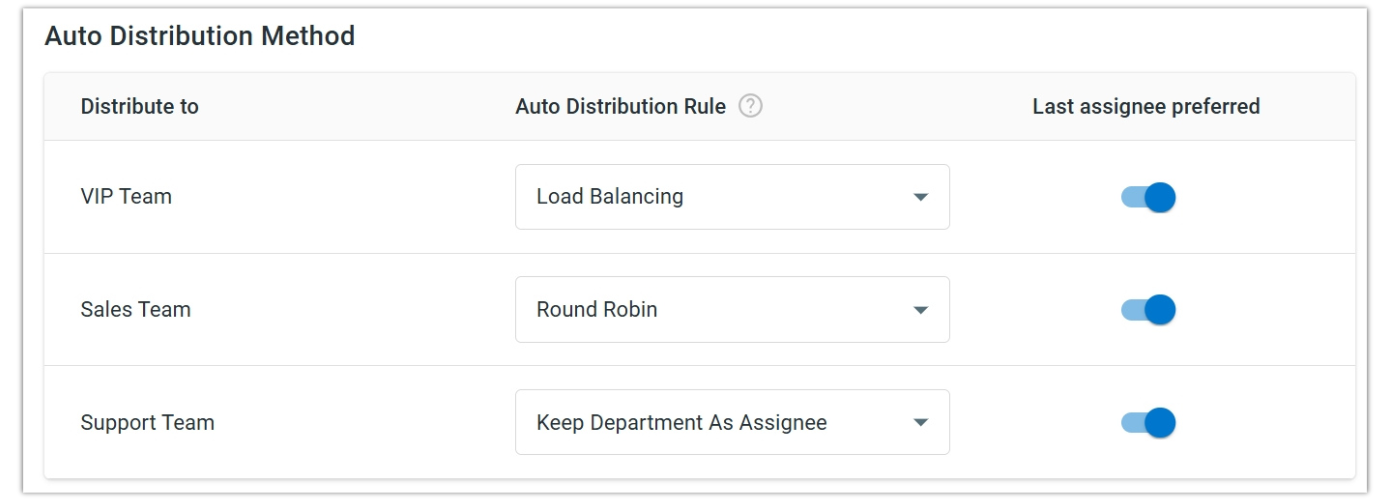
When Telegram messages become tickets in Comm100’s Ticketing & Messaging system, auto distribution ensures optimal workload balance across your support team. The platform offers two primary distribution methods:
Load Balancing assigns new tickets to the agent with the lowest capacity utilization rate, ensuring work is distributed evenly based on current workload rather than simple rotation.
Round Robin allocates tickets to agents sequentially based on the order they come online, providing equal exposure to incoming requests across team members.
Flexible Capacity Management
Maximum ticket limits can be customized for individual agents or applied universally across your team. For example:
- Experienced agents: Set higher limits (15-25 concurrent tickets)
- New team members: Lower limits (5-10 tickets) during training periods
- Department-specific limits: Different capacity rules for specialized teams
Custom Routing Rules
You can route tickets to specific departments or agents using either default assignments or by creating custom rules based on conditions like contact identity, contact name, first message channel, first message channel account, first message content, subject, and ticket ID.
Rules can be prioritized and ordered to ensure tickets reach the appropriate team members.
What Metrics Should Managers Track to Optimize Support Performance?
There are several key metrics that you should be tracking as part of effective oversight on the CX function. Once you have industry benchmarks, it’s a good idea to evaluate how your team is performing. You can track the following metrics with the native Telegram integration from Comm100.
Response Time Metrics
These primarily include:
- First Response Time: The speed with which agents acknowledge new Telegram chats. Whether you’re tracking metrics in the iGaming space or finance, this is a crucial indicator of your team’s proactiveness.
- Average Resolution Time: Total time from initial customer message to issue closure. Longer resolution times often indicate knowledge gaps or process inefficiencies that need addressing.
Agent Performance Indicators
- Agent Response Time: The time it takes an agent to reply to ticket messages. Monitor this metric to identify agents who may need additional training or are handling overly complex issues that require process improvements.
- First Response Time: The time it takes an agent to send the first response in a ticket. This critical metric directly impacts customer satisfaction and SLA compliance, especially important for Telegram where users expect immediate responses.
- Bot to Agent Tickets: The number of tickets that involved both chatbot and human agent interaction. Track this ratio to optimize your AI automation and identify opportunities to resolve more issues through automated responses before requiring human intervention.
Operational Efficiency
- Volume: The number of tickets generated from Telegram conversations specifically. Compare this volume against other channels to understand Telegram’s impact on your overall support workload.
- SLA Breached Tickets: The number of tickets that failed to meet defined SLA targets for response or resolution times. Our KB article on Ticketing & Messaging covers the full list of metrics that you can track.
Conclusion
Comm100’s Telegram integration transforms these otherwise unending, free-flowing conversations into a structured, trackable support system with intelligent routing, comprehensive analytics, and seamless ticket management.
Instead of juggling multiple chat windows and losing track of customer issues, your team gains the visibility and automation tools needed to scale efficiently.
Ready to see how organized Telegram support works? Experience the difference between chaotic messaging and professional customer service with a hands-on demonstration of Comm100’s Telegram capabilities.
Transform Customer Service with AI
See how Comm100 turns Telegram chats into SLA-compliant, trackable tickets. Schedule your personalized demo and experience AI-powered support in action.
Book a demo nowRequest Demo