It’s live! Access exclusive 2026 AI live chat benchmarks & see how your team stacks up.
Unlock the insights
It’s live! Access exclusive 2026 AI live chat benchmarks & see how your team stacks up.
Unlock the insights
Shorter Wait Times and Smoother Customer Experiences
Transform long lines and uncertain wait times into structured, predictable customer journeys with Comm100 Queue Management, and keep your customers informed every step of the way.
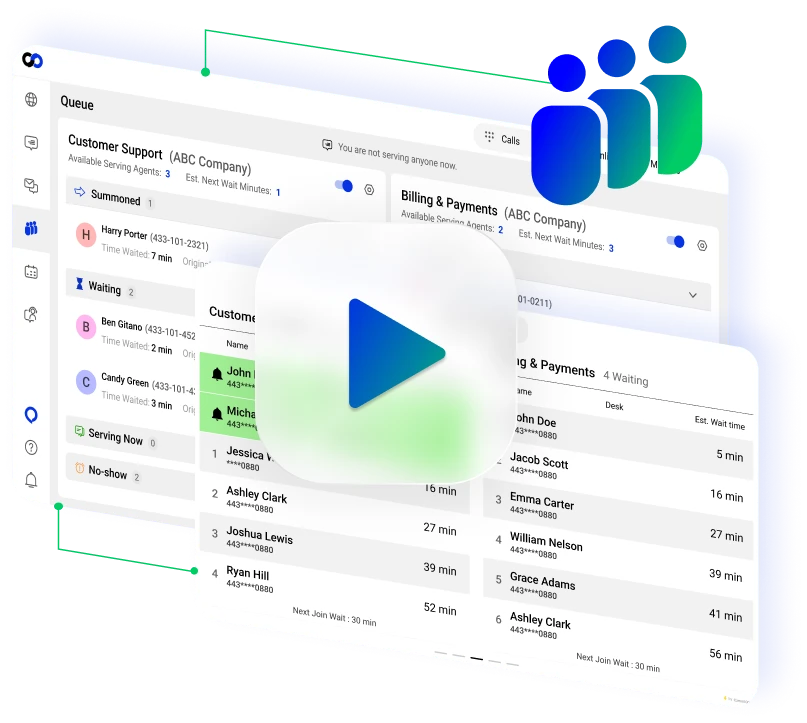





















Reduce wait-time frustration with a smooth queueing experience

Optimize staff allocation in real time

Gain full visibility into queue performance
Waiting is one of the biggest and most recurring sources of customer dissatisfaction. Comm100 Queue Management replaces uncertainty with clarity by organizing customer flow, improving communication, and helping teams manage peak demand with confidence.
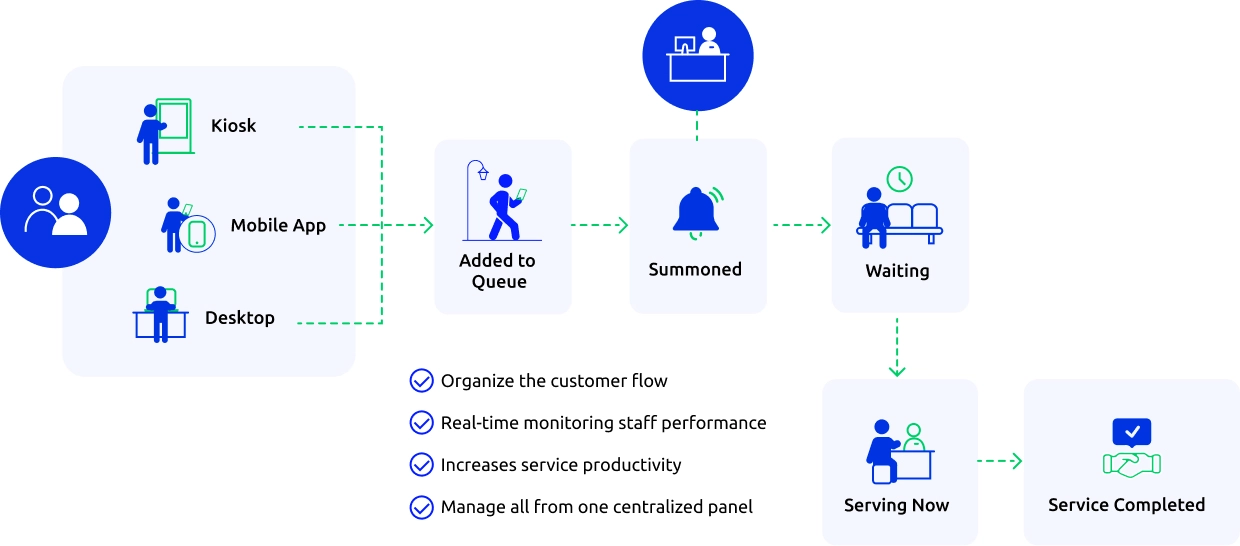
Comm100 Queue Management enables your customers to join queues digitally, check their position in line, and get wait time estimates and automated notifications by SMS or email to stay informed and engaged instead of leaving.
“Comm100 has been an invaluable partner in revolutionizing the queue management system for UBC Vancouver’s Science Advising team. Their personalized approach, evident right from the initial meetings through to product launch, ensured a tailored solution that exceeded our expectations. The team’s responsiveness, collaborative nature, and continuous post-launch support set them apart. Comm100 is not just a service provider; they are a dedicated partner committed to our success.”
– Chris Oatman, Associate Director, Student Experience, Faculty of Science, UBC Science
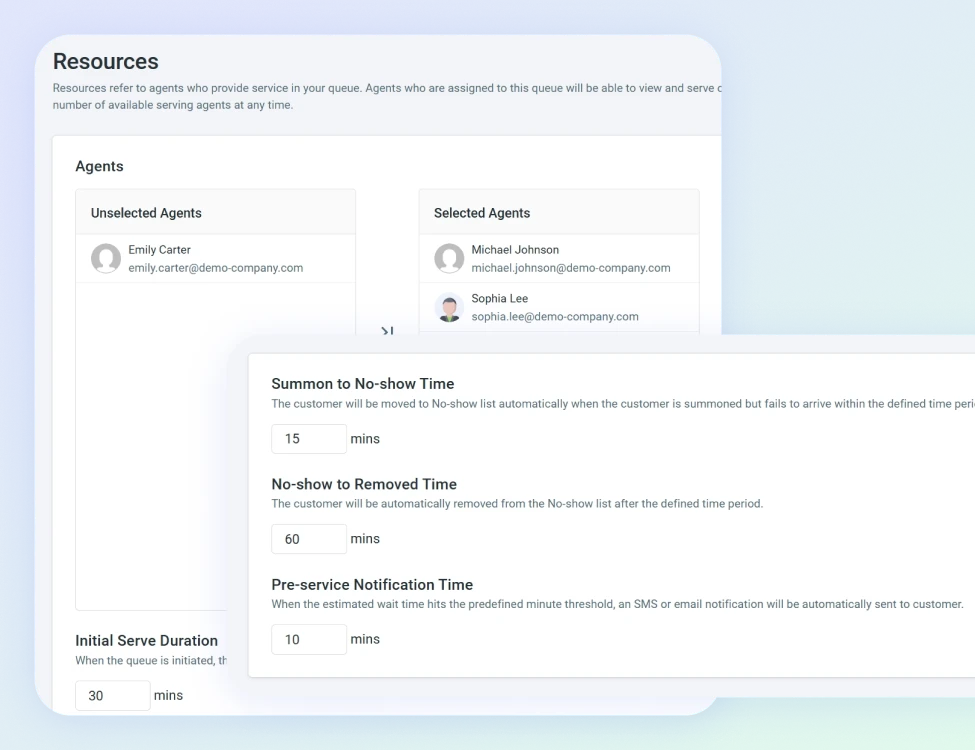
Manage queue flow, service counters, and staff assignments from one intuitive interface. Adjust staffing levels and queue rules dynamically to handle peak traffic and unexpected surges.
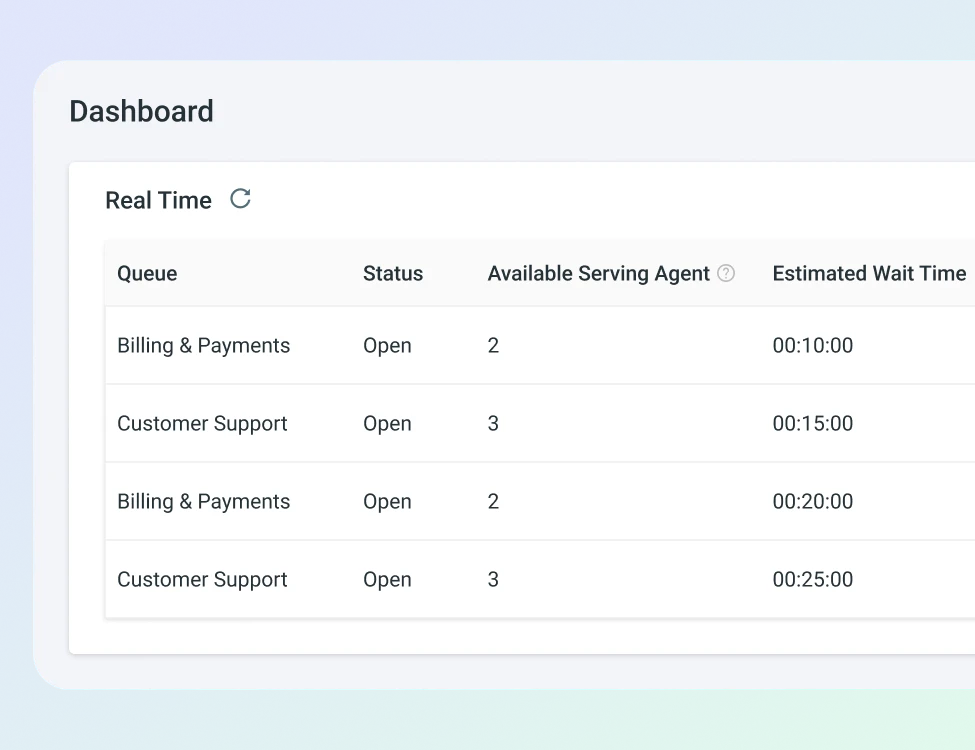
Monitor live queue length, wait times, and service progress to make informed operational decisions.
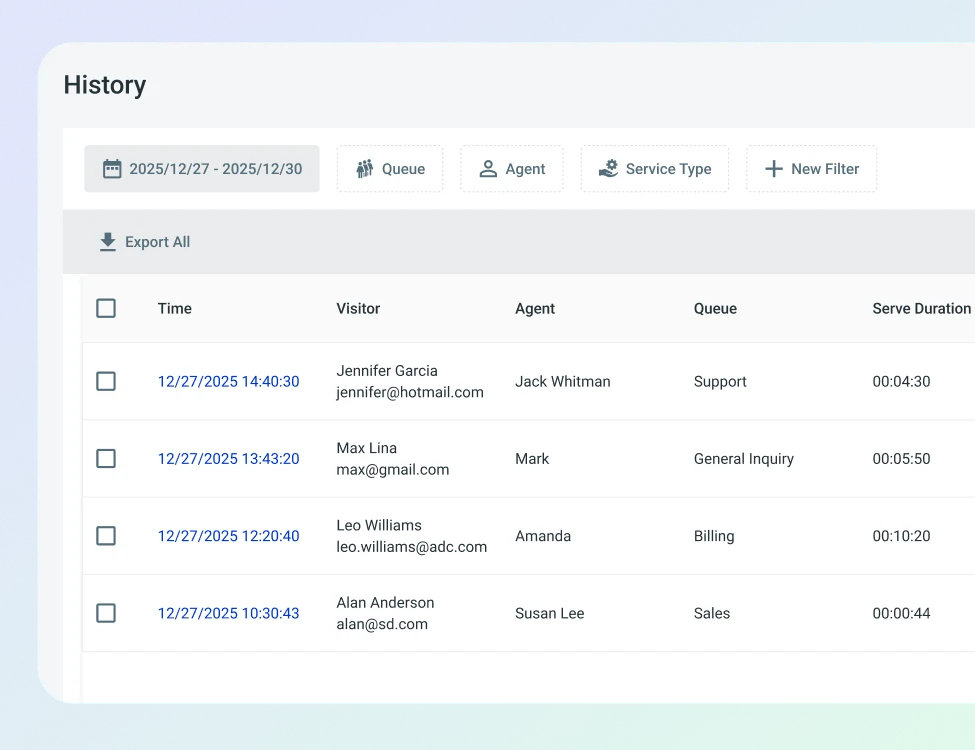
Analyze historical and real-time queue data to align staffing with demand patterns. Use reporting insights to pinpoint service bottlenecks and improve workflow efficiency. Track key metrics such as average wait time, service duration, and customer throughput to drive continuous improvement.

Reduce wait times, improve flow, and keep customers informed.

More acceptable wait times through better choices & communication

Higher customer satisfaction with transparent updates

Improved staff efficiency through structured flow control

Greater operational visibility across locations and service areas
Queue management software replaces physical lineups with a digital system that tracks who’s waiting, how long they’ve been waiting, and who’s available to serve them. Visitors check in (online, on-site, or via mobile), join a virtual queue, receive updates on their position and estimated wait time, and get notified when it’s their turn.
It’s used by any organization where people wait for in-person or virtual service. Universities use it for advising, registrar, and financial aid offices. Government agencies use it for citizen services like permit applications and benefits enrollment. Healthcare clinics use it for patient intake. Banks and credit unions use it for branch visits. The common thread is a service environment where walk-in or appointment-based traffic creates unpredictable wait times that frustrate visitors and strain staff.
The shift from physical lineups to virtual queuing took off during the pandemic, but the benefits go well beyond health protocols. When visitors can join a queue from their phone and wait wherever they want instead of standing in a hallway, the experience improves even when the actual wait time stays the same. People tolerate waiting much better when they know how long it will take and can use that time productively.
Virtual queuing doesn’t always make service faster, but it makes waiting feel shorter and gives visitors a reason to stay instead of leaving.
The biggest source of walk-aways isn’t the wait itself. It’s the uncertainty. Someone standing in a physical line with no idea whether they’ll be seen in 10 minutes or 60 minutes makes a rational decision to leave, especially if they have other things to do. A virtual queue that shows estimated wait time, position in line, and real-time updates removes that uncertainty. Visitors who know they’re 15 minutes away stick around. Visitors who know they’re 45 minutes away can step out, grab coffee, and come back when they’re closer to the front.
SMS and email notifications play a direct role here. When the system texts a visitor to say “You’re next in 5 minutes,” the visitor shows up ready. No-shows drop. The line moves. Service capacity that would have been wasted on empty slots gets used. Staff spend less time calling names into a waiting room and more time actually serving people.
Appointment scheduling lets visitors book a specific time slot in advance. Queue management handles walk-in traffic and on-the-day flow. They solve different problems, and most service environments need both.
Appointment scheduling works well when demand is predictable and visits can be planned ahead. A student booking an advising appointment next Tuesday, or a citizen scheduling a passport renewal for next week. The visitor picks a slot, shows up at that time, and gets served. The limitation is that not every visit can be planned. Walk-ins happen. Appointments run long. People arrive early or late. The schedule breaks the moment real-world variability enters the picture.
Queue management handles that variability. When a walk-in student shows up at the registrar’s office without an appointment, the queue system gives them a place in line, an estimated wait time, and notifications when their turn arrives. When an appointment runs 20 minutes over and the next three visitors are waiting, the queue system keeps them informed rather than leaving them to guess. The two tools work best together: appointments handle the predictable, planned visits, and queue management handles everything else.
Queue management and live chat serve overlapping populations through different access points. A student might visit the advising office in person on Monday and message the same office via live chat on Wednesday. The question is whether those two interactions live in the same system or in separate silos.
When queue management is part of the same platform as live chat, messaging, and ticketing, the benefits compound. Staff see all student or citizen interactions in one console, whether the interaction happened in person through the queue or digitally through chat. Managers see combined volume and performance data across both physical and digital channels. And visitors who use both channels don’t experience the disconnect of dealing with two completely separate systems that have no awareness of each other.
Comm100 Queue Management is a virtual queuing system built into the Comm100 omnichannel platform. It manages the flow of visitor inquiries from pre-arrival through post-service, covering check-in, wait time communication, agent assignment, and service analytics.
Visitors enter the queue by providing basic details about themselves and their query (name, phone number, reason for visit). They receive real-time SMS and email notifications with their waiting status and estimated wait time. They can view their position, and they can delay their turn if they need more time. Agents see how many visitors are waiting, how many agents are serving, and can manage queue priorities by re-entering or pushing back visitors as needed.
The system is used by universities like UBC, where Chris Oatman, Associate Director of Student Experience in the Faculty of Science, described Comm100 as “a dedicated partner committed to our success” after deploying it for the Science Advising team.
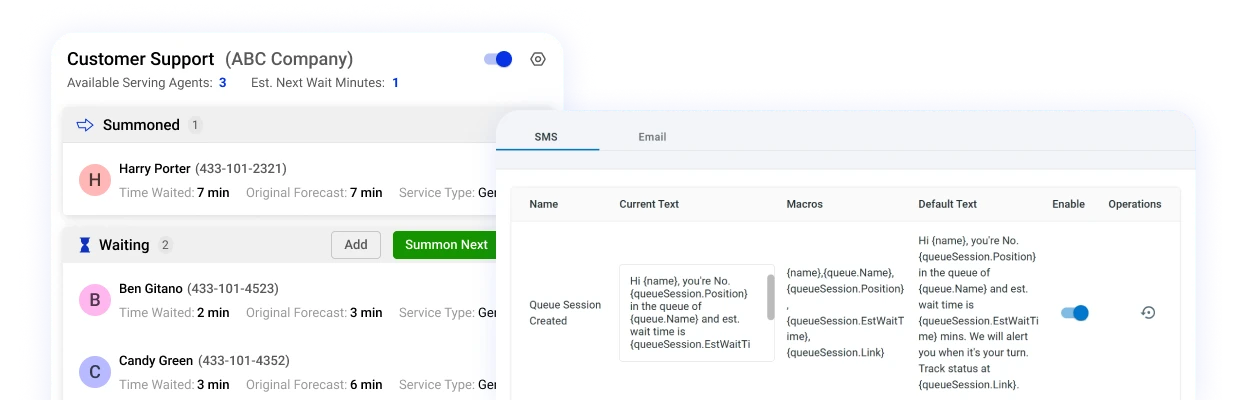
Visitors receive real-time SMS and email notifications with their current waiting status and estimated wait time. These messages are customizable and can be automated based on different scenarios: a notification when they first join the queue, an update when they move closer to the front, and a final alert when it’s their turn.
The messaging text is configurable through the admin console, so you control the tone, content, and timing of every notification. Visitors don’t need to download an app or stay on a specific webpage. They get updates on their phone through standard SMS, which means the system works for anyone with a mobile phone regardless of how comfortable they are with technology. This matters particularly for government agencies serving older populations and universities serving visitors with varying levels of tech familiarity.
Comm100 stores queue-related data and post-service reports within its analytics suite. The reporting covers total users summoned, no-shows, visitors served, visitors removed, average wait time, and average serve time.
These reports help managers answer the operational questions that drive staffing and process decisions. Which days and times produce the highest queue volumes? How many agents do we actually need during registration week versus a normal Tuesday? What percentage of visitors are no-shows, and at what point in the wait do they leave? Is one department’s average serve time significantly longer than another’s, and if so, why?
The data feeds into the same analytics environment as Comm100’s other tools (live chat, ticketing, messaging), so managers can compare physical queue performance against digital channel performance in the same reporting dashboard. A university advising office that handles both walk-in visits and live chat inquiries can see the full picture of demand rather than managing two separate data sources.
The pricing for the Comm100 Queue Management is $30 /agent/month, billed annually. For those who wish to pay monthly, it’s $18 /agent/month.

Six AI solutions that automate, assist, and elevate every part of your support lifecycle

Connect in real-time with text, audio, video, screen sharing & more

Email, social media, SMS and more – all from one platform

Easy-to-find help resources for both customers and agents

Engage with customers via inbound and outbounds calls

Empower customers to book appointments or meetings with ease
Reduce wait times, improve flow, and keep customers informed with smart queue management.