It’s live! Access exclusive 2026 AI live chat benchmarks & see how your team stacks up.
Unlock the insights
It’s live! Access exclusive 2026 AI live chat benchmarks & see how your team stacks up.
Unlock the insights
Knowledge Base
A well-designed and content-rich knowledge base is a critical foundation for fast and efficient self-serve and assisted support. It also serves as the intelligence backbone of your AI ecosystem.
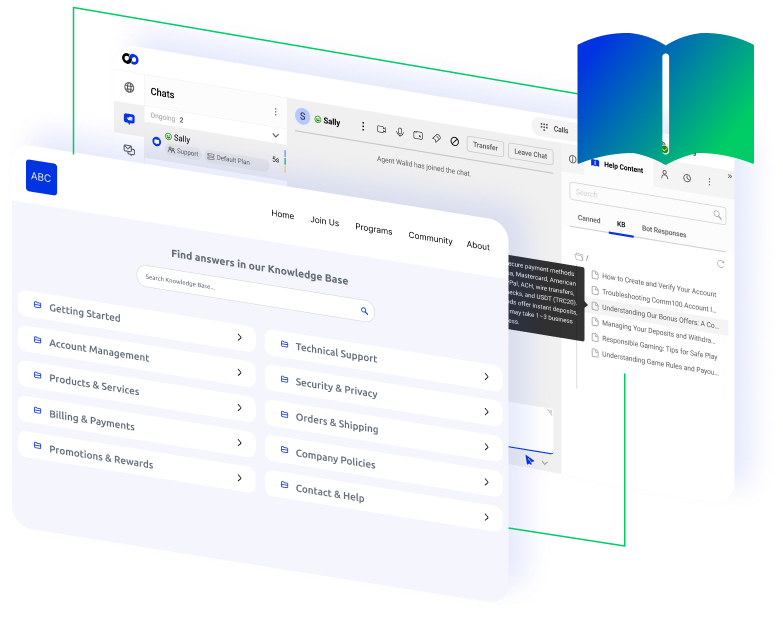





















Create and maintain help content in one centralized system for all to use

Empower customers to find answers on their own

Give agents – human and AI – access to accurate, up-to-date support information

Maintain tight control with structured publishing and effective version management
Most support questions you get are predictable and repetitive. A good knowledge base codifies and standardizes responses so they’re easier to find – whether via customer self-serve or with the help of a support agent. It’s your single source of truth that improves resolution speed, consistency, and customer confidence across every channel.
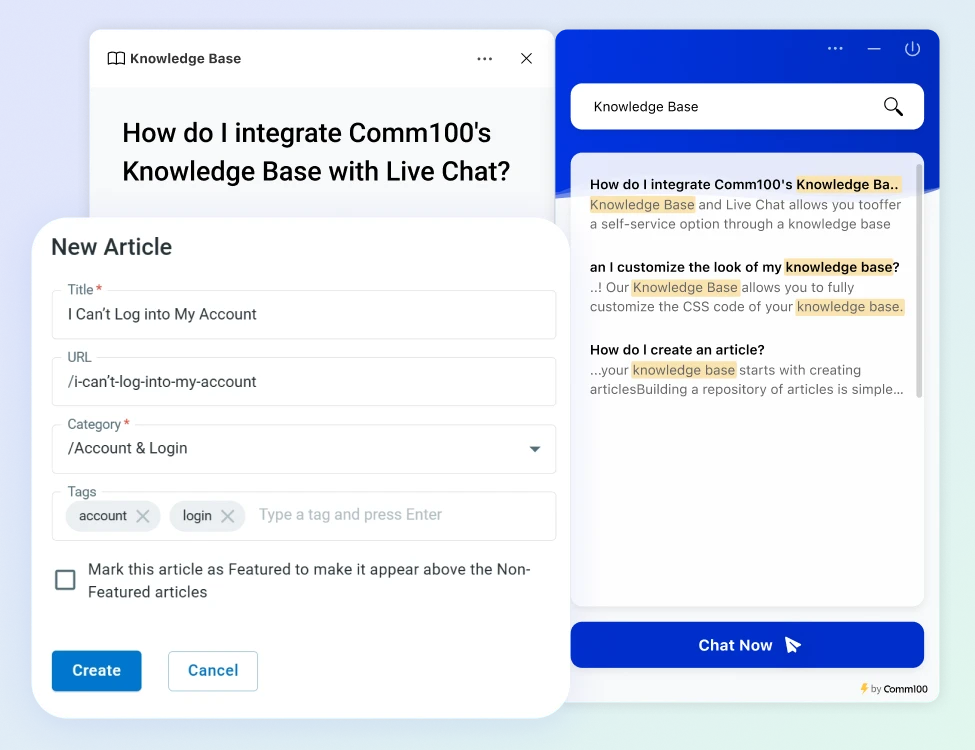
Create structured articles with categories, tags, and search optimization so customers can quickly find the information they need. The Comm100 Knowledge Base is searchable within the chat window, before users connect to an agent.
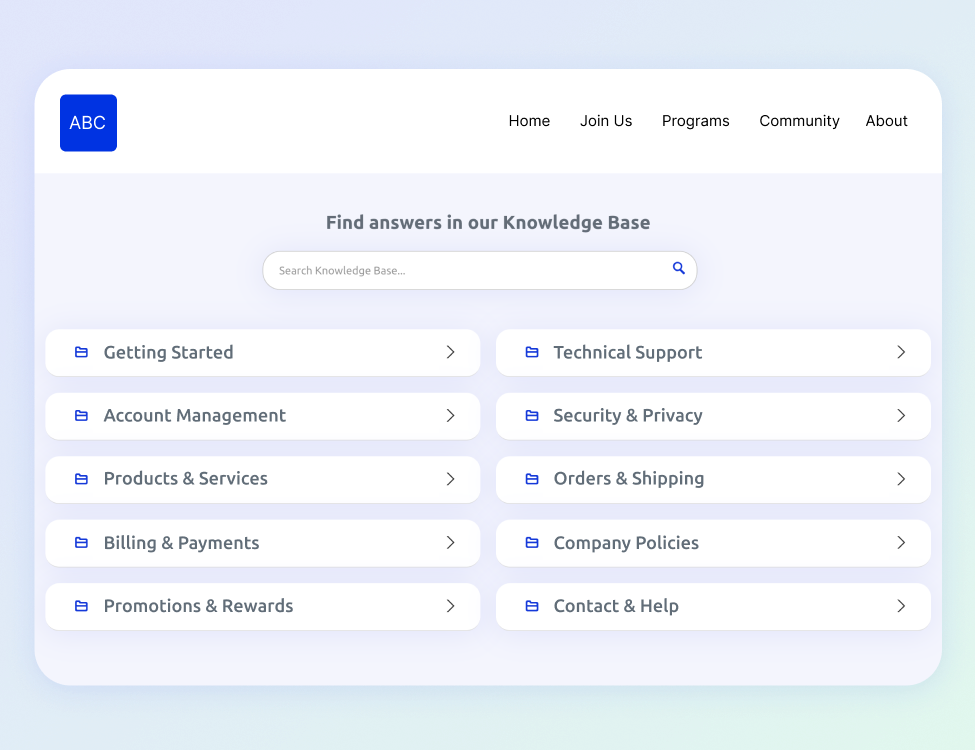
Deflect common questions by publishing clear, accessible resources that guide customers to resolution before they contact support.
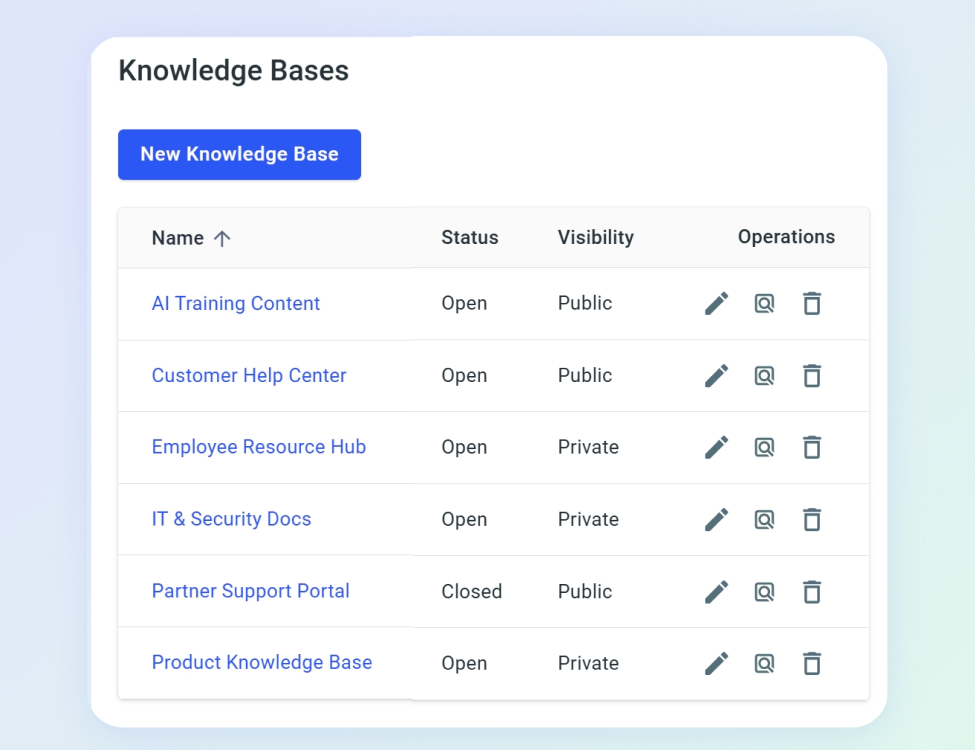
The Comm100 Knowledge Base supports live chat, ticketing & messaging, and works with the Comm100 AI Suite to ensure customers always get accurate responses no matter where or when they reach out. You can even customize visibility by audience (customers, staff, partners) and manage multiple knowledge bases from one centralized platform.
“I love Comm100’s Knowledge Base. It is so thorough and has really helped me to try out new features and settings that have improved our agent and customer experiences.”
– Katie Miller
Team Lead, Outbound & Electronic Relations, Veridian Credit Union
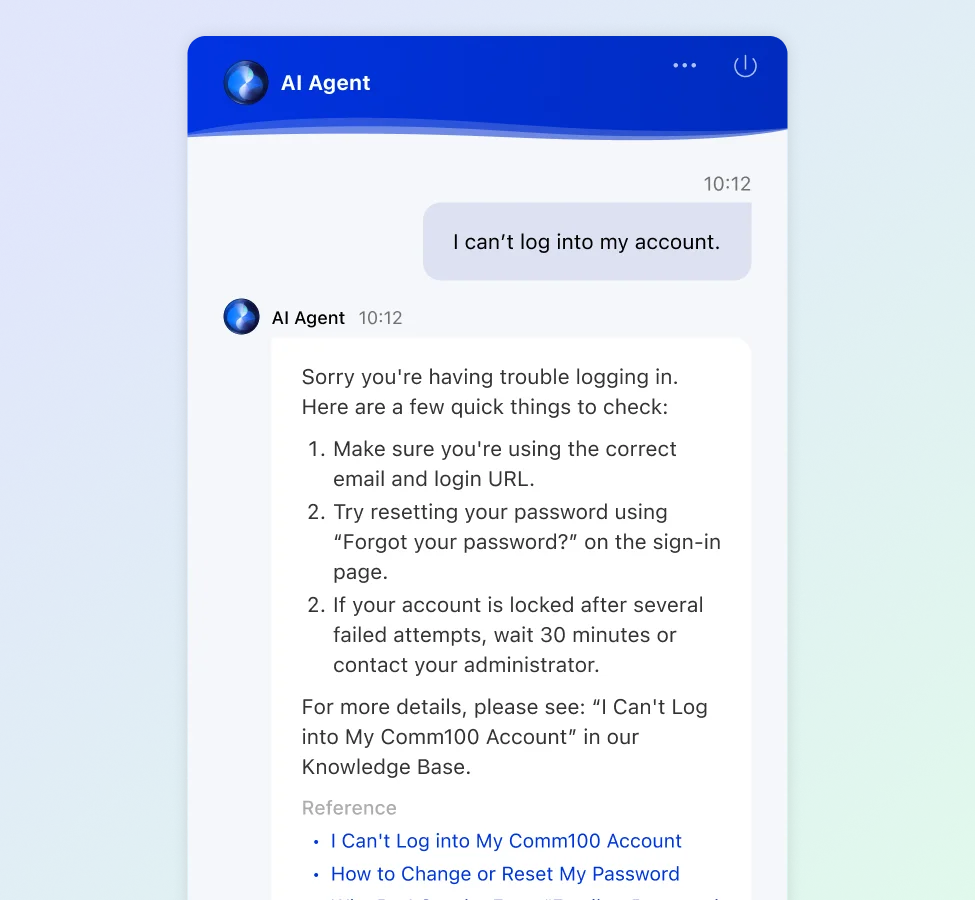
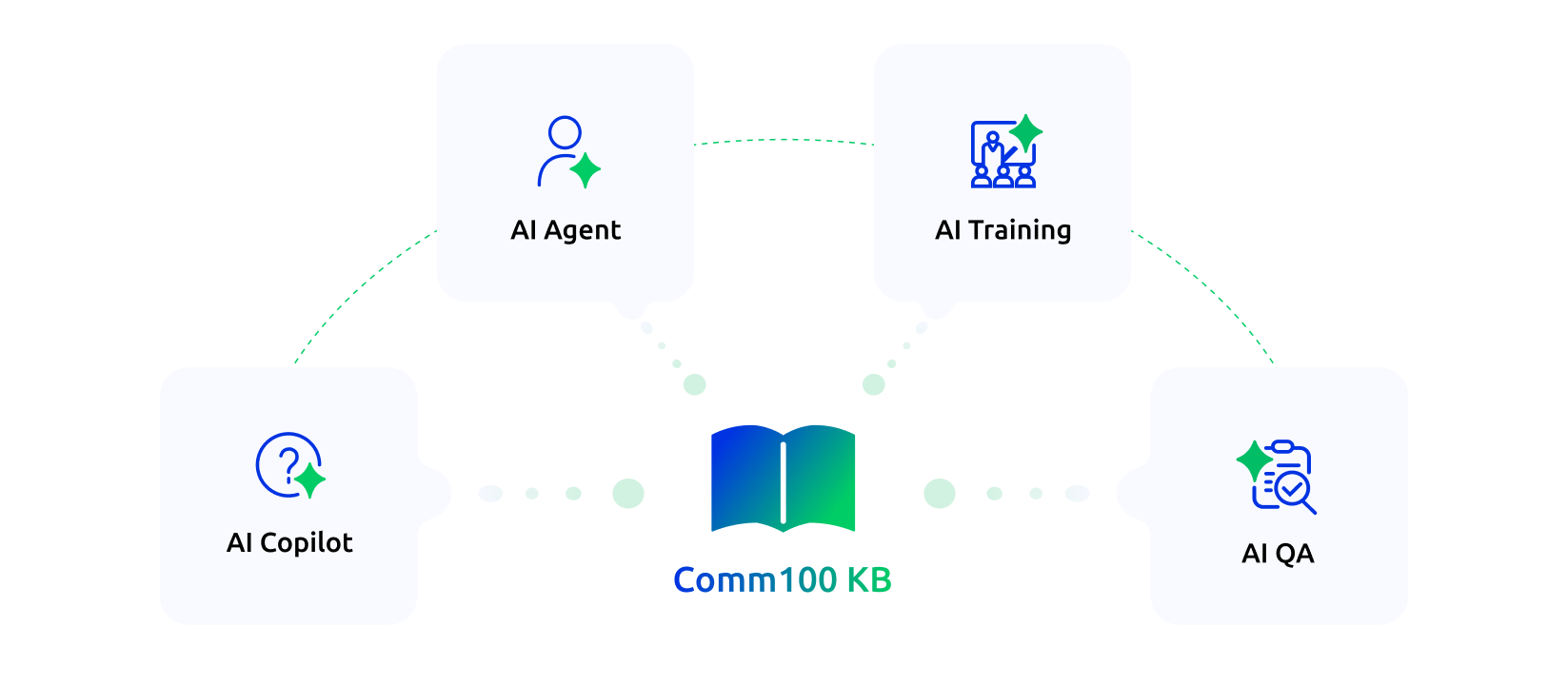
Comm100 AI Agent uses the Comm100 Knowledge Base as a key information source, drawing on its content to power responses to customer inquiries. As your knowledge base expands, so do the capabilities of your AI Agent to handle inquiries on its own.
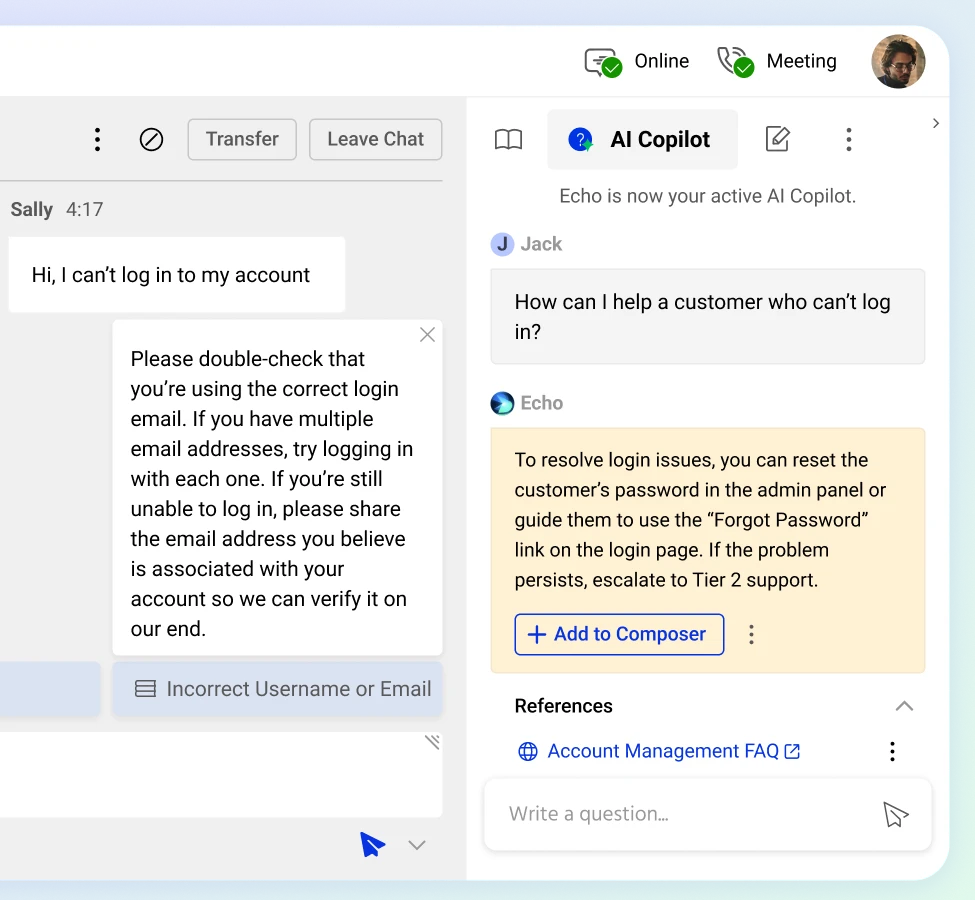
AI Agent AI Copilot taps into Comm100 Knowledge Base to surface answers and information faster than your customers can ask questions, helping your agents resolve issues more quickly and more confidently.
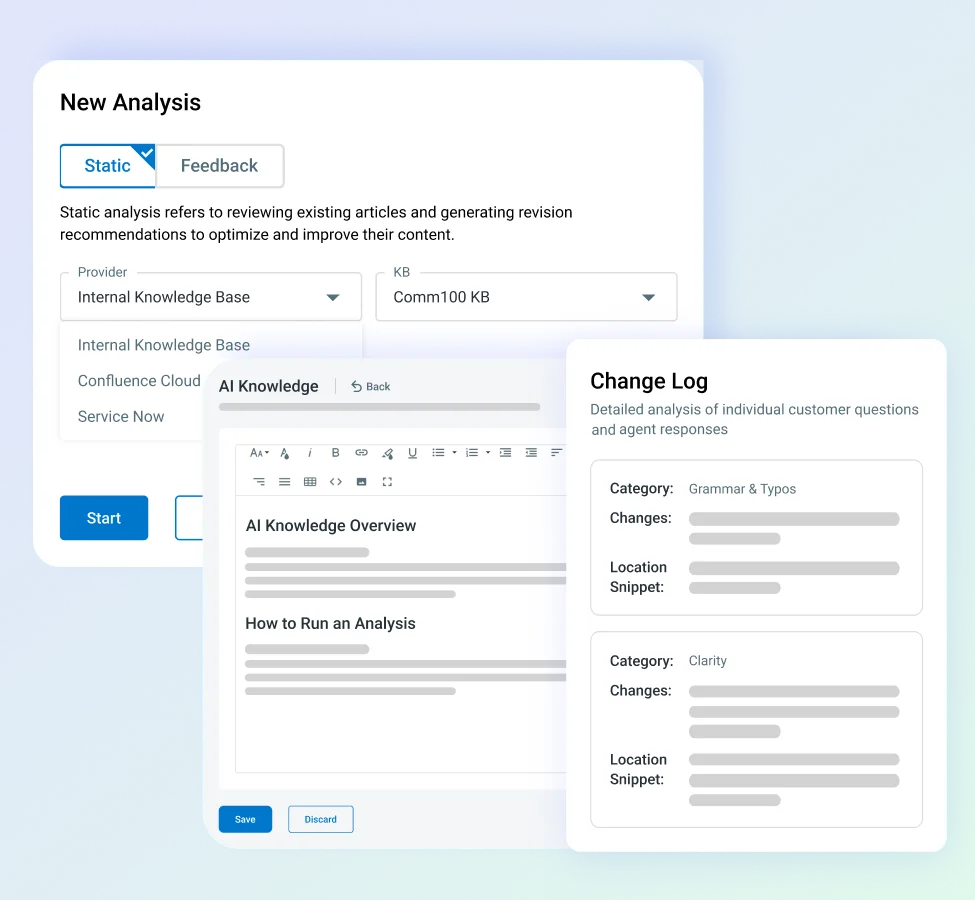
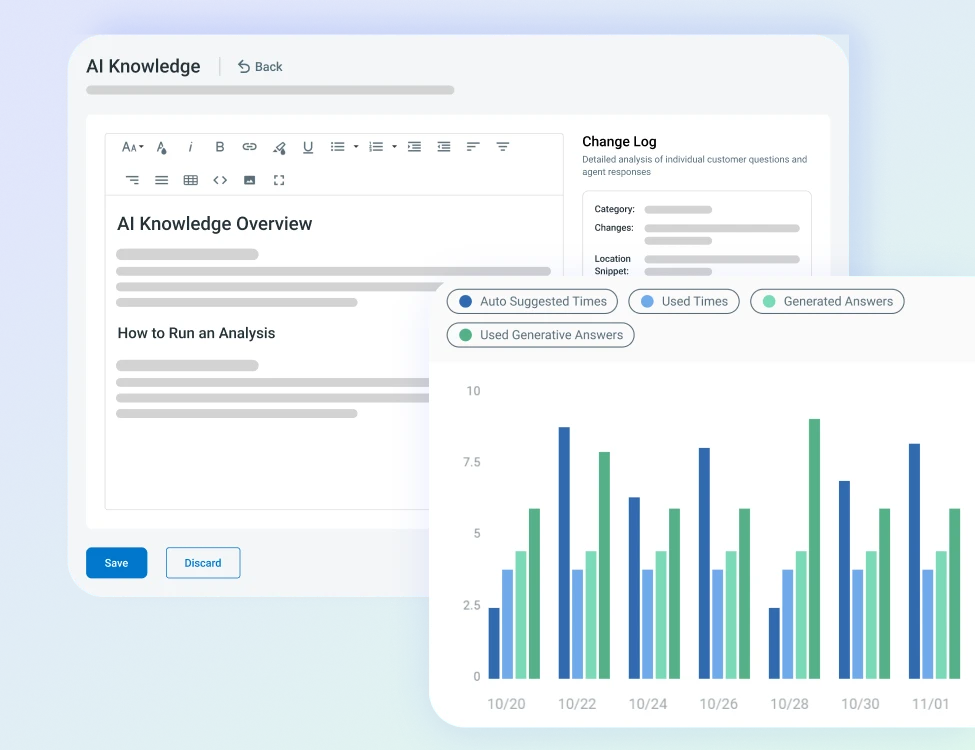
Supercharge your Comm100 Knowledge Base with AI AgentAI Knowledge, our content discovery and enhancement automation system. AI Knowledge identifies gaps and conflicts in your knowledge base and can even draft article revisions and new articles for you.
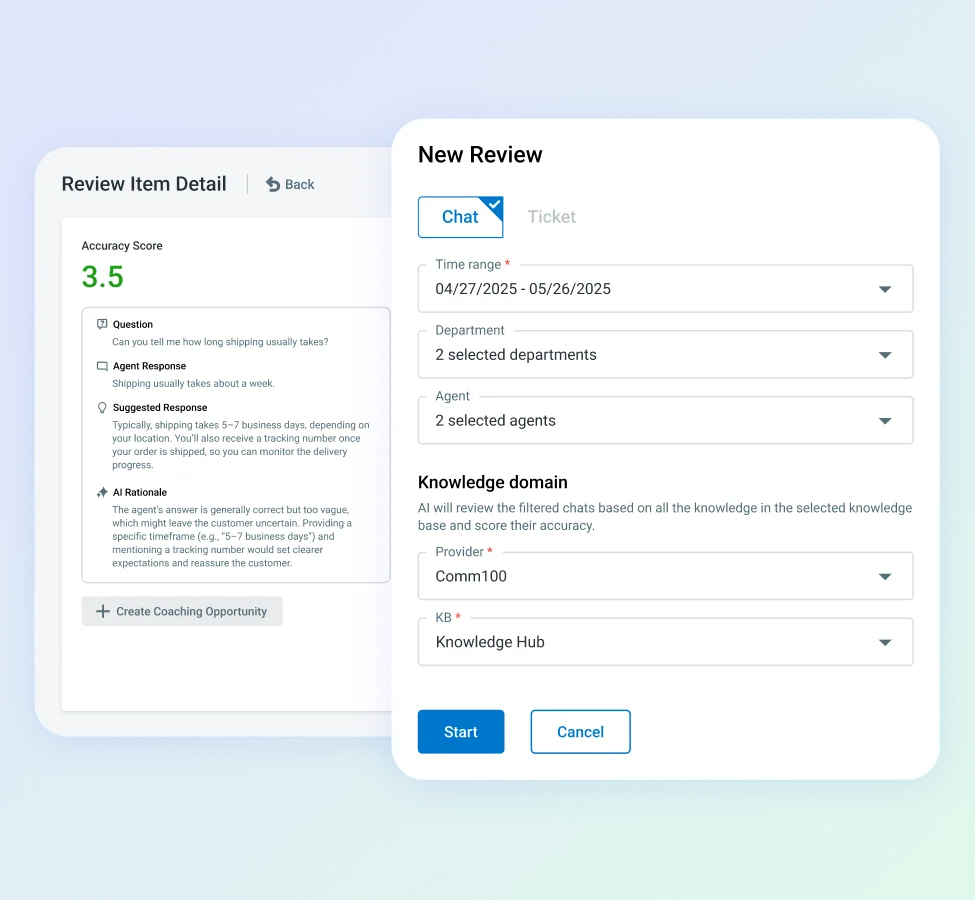
When you use AI QA to review and rate agent responses, it uses Knowledge Base to make the assessments
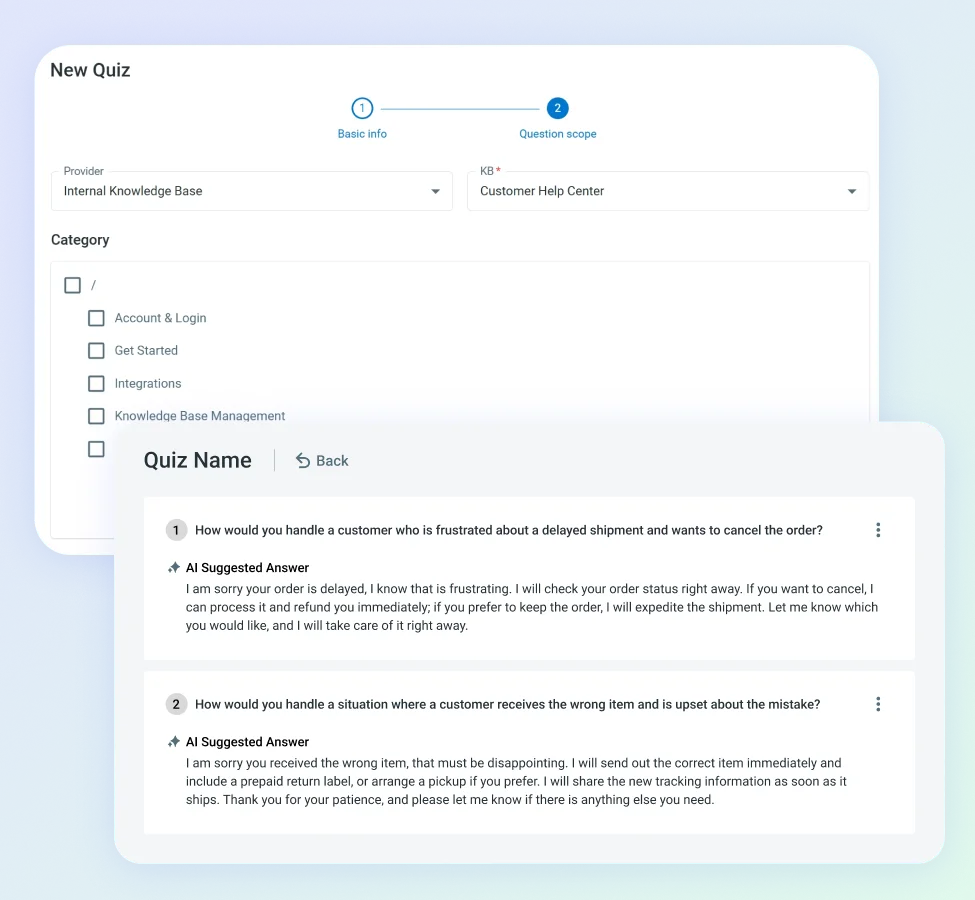
Make new agent training a breeze with AI Training, which uses Knowledge Base to build quizzes and assess agent performance while greatly reducing the need for shadowing or costly group training.
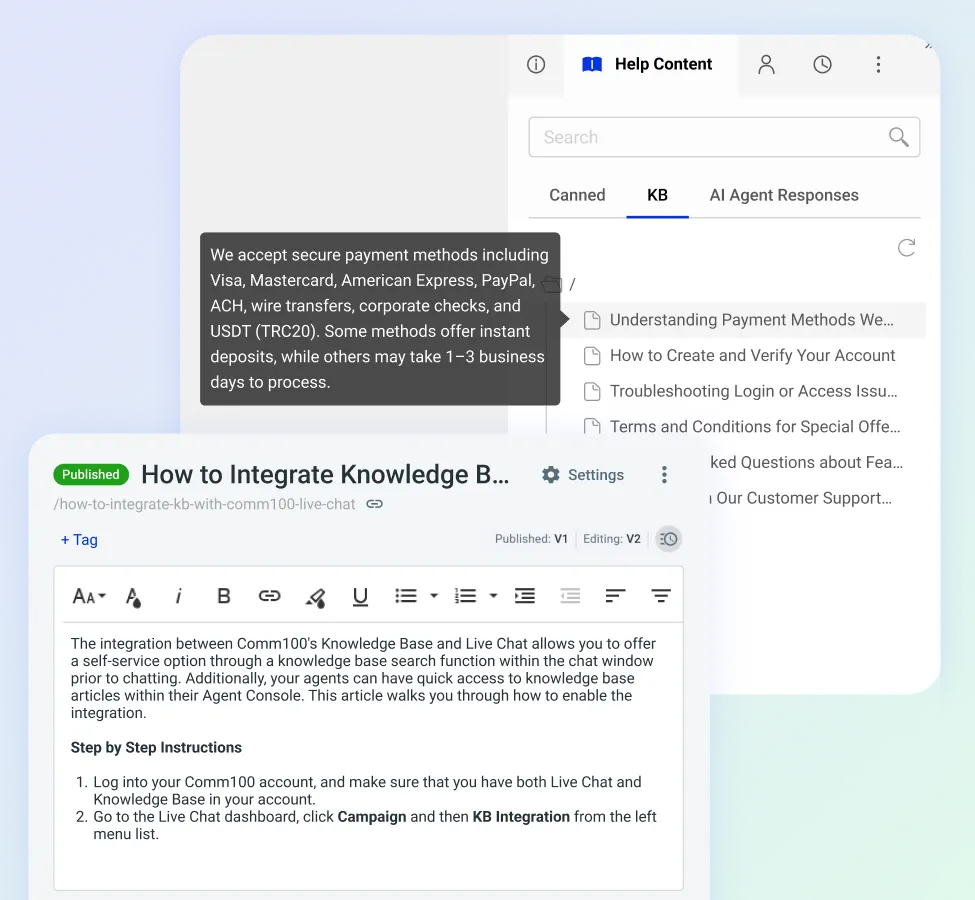
The Comm100 Knowledge Base gives your agents a centralized content hub with fast search, organized categories, and version-controlled articles. And it’s all accessible right from the Comm100 agent console, no app switching required.
Ensure your agents reference approved, up-to-date content instead of relying on memory or scattered notes & documents with our knowledge base software.
The Comm100 Knowledge Base software enables easy collaboration on drafts and control publishing workflows to maintain quality and consistency.
Monitor search queries, feedback, and usage trends to understand where customers & agents struggle and where new content is needed. Use AI Knowledge to automate and accelerate the process for even smarter content management.
Access reporting insights to refine articles, optimize structure, and improve deflection rates over time.

Enable self-service, boost efficiency, and fuel AI with a smart, centralized knowledge base.

Faster resolutions through reliable, accessible information

Higher self-service adoption and reduced ticket volume

Greater consistency across channels and teams

Improved customer satisfaction from accurate, structured content
Knowledge base software is a platform for creating, organizing, and publishing a searchable library of articles, guides, and FAQs that customers and agents can access to find answers without submitting a support request.
If offers a self-service portal for users where they can resolve common questions on their own. Agents can use it as a reference library they can search during live conversations to find accurate, approved answers quickly.
Support teams need it because a significant share of incoming inquiries are repetitive. Password resets, refund policies, enrollment deadlines, account setup procedures, product specifications. These questions have documented answers, and every time an agent handles one manually, it consumes time that could be spent on complex issues requiring human judgment. A knowledge base deflects those repetitive contacts by making the answers findable before the customer clicks “contact us.”
A well-maintained knowledge base improves agent response quality because agents reference consistent, approved content rather than working from memory. It reduces onboarding time for new agents because they have a searchable reference from day one instead of learning through tribal knowledge.
It also powers AI tools: chatbots, AI agents, and AI copilots all draw from the knowledge base to generate accurate, grounded responses. Without a strong knowledge base underneath, those AI tools have nothing reliable to reference.
Comm100 Knowledge Base is a searchable, self-service content platform available as a standalone product or with the Comm100 omnichannel suite. It lets organizations create, organize, and publish articles, guides, and FAQs that serve three audiences simultaneously: customers looking for answers on their own, agents handling live conversations who need quick reference material, and AI tools that draw from knowledge base content to generate accurate, grounded responses.
The Comm100 Knowledge Base software serves as a primary content source for three AI products. AI Agent draws from knowledge base articles to resolve customer queries autonomously across live chat, SMS, and messaging channels. AI Copilot uses knowledge base articles as one of its core answer sources when suggesting real-time responses to human agents during conversations.
And AI Knowledge sits on top of the knowledge base system and automates its maintenance: scanning for outdated content, detecting gaps by analyzing unanswered customer questions and thumbs-down ratings, generating revision recommendations, and drafting entirely new articles from real customer conversations.
AI Knowledge also integrates with Confluence and ServiceNow for organizations managing documentation across multiple platforms.
The Comm100 Knowledge Base serves as the foundational content layer for the entire support operation.
An FAQ page is a flat list of questions and answers, typically on a single web page. It works well when an organization has 10 or 20 common questions. It breaks down when the number of topics grows, when answers require detailed explanations, or when different audiences need different information.
A knowledge base is a structured, searchable system organized by categories, subcategories, and tags. Articles can include formatted text, images, embedded videos, downloadable files, and cross-references to related content.
Visitors navigate by browsing categories or by searching keywords, and the system returns results ranked by relevance. A knowledge base can scale to hundreds or thousands of articles across dozens of categories without becoming unusable.
Organizations that start with an FAQ page typically outgrow it within their first year of scaling support. Migrating to a knowledge base early avoids the painful process of restructuring content later, when the volume is higher and the stakes are greater.
The organizational structure should mirror how your customers think about their problems, not how your internal teams are organized. Customers don’t know (or care) which department handles their question. They know they have a question about billing, or enrollment, or account setup.
Start with broad, intuitive categories that map to the major topics your customers contact you about. A university might use categories like Admissions, Financial Aid, Academic Programs, IT Help, and Student Services.
An iGaming platform might use Account Management, Withdrawals, Deposits, and Games. Within each category, subcategories add granularity as the content grows.
Each article should answer one specific question. An article titled “Financial Aid” that covers eligibility, application deadlines, disbursement schedules, and appeal processes is too broad. Visitors searching for “when is financial aid disbursed” won’t find a clear answer in a 2,000-word overview. Break it into four separate articles, each answering a distinct question with a descriptive title.
Titles should match how customers phrase their questions, not how your organization labels its processes internally. “FAFSA Verification Process for Incoming Students” is internal language. “How do I verify my financial aid application?” is how a student would search. Writing titles in question format improves both knowledge base search and external search engine visibility.
Tagging adds a secondary navigation layer. An article about resetting a password on the mobile app might sit in the IT Help category but should also be tagged with “mobile,” “password,” and “login” so it surfaces regardless of which path the visitor takes. Tags compensate for the fact that any single categorization system can’t capture every way a visitor might approach a topic.
A knowledge base serves three distinct integration roles depending on who’s using it:
Customer-facing integration surfaces knowledge base articles directly in the chat widget. Before a visitor starts a live chat, the system can present a search bar that lets them look up their question in the knowledge base first.
If they find their answer, the chat never starts and no agent time is consumed. This is one of the most effective deflection mechanisms available because it catches the visitor at the exact moment of intent, when they’re about to create a support interaction.
Agent-facing integration embeds the knowledge base inside the agent console. During a live conversation, agents can search for articles by keyword without leaving the chat window.
They can then send the article URL directly to the visitor, copy specific passages into their response, or reference the article content while composing their own reply.
This eliminates the alt-tab workflow where agents search a separate system for information, and it ensures agents reference the approved, current version of the content rather than working from memory.
AI agents draw from knowledge base articles to generate autonomous responses. Tools like the AI Copilot use knowledge base content as one of their primary answer sources when suggesting replies to human agents.
The quality of every AI-generated response is directly dependent on the quality, completeness, and currency of the knowledge base underneath it. An AI agent grounded in a comprehensive, well-maintained knowledge base gives accurate answers. The same AI agent grounded in an outdated, incomplete knowledge base gives unreliable ones.
Comm100’s Knowledge Base integrates directly with the live chat system at two touchpoints: the visitor experience and the agent workflow.
On the visitor side, the integration adds a knowledge base search tab within the chat widget. Before starting a chat, visitors can search for articles using keywords. If the search returns a relevant article, the visitor reads it and resolves their question without initiating a chat session.
You configure which knowledge base to integrate with each campaign, the greeting message displayed on the search page, and the maximum number of articles shown in search results. You can also enable knowledge base search on the offline message form, so visitors can self-serve even when agents aren’t available.
On the agent side, a Knowledge Base tab appears within the agent console under Help Content when the integration is enabled. Agents search for articles by keyword while handling live conversations.
From the results, agents can send article URLs directly to visitors as chat messages, insert URLs into the text input area for editing before sending, click article titles to view full content within the console, and copy sentences or images from articles to paste into their replies.
This means agents never leave the chat window to find reference material. They search, review, and share knowledge base content from the same interface where they’re managing the conversation.
Comm100 AI Knowledge is an AI-powered layer that automates the maintenance, auditing, and expansion of your knowledge base. It sits on top of the knowledge base and does the work that content managers traditionally handle manually: identifying gaps, flagging outdated content, and drafting new articles.
Gap detection works by analyzing customer conversations and chat feedback to identify questions that aren’t answered in the knowledge base. When customers ask questions that lead to unanswered queries or thumbs-down ratings on bot responses, AI Knowledge flags those topics as content gaps and prioritizes them by volume and impact. Instead of guessing which articles to write next, you see a data-driven list of the topics that would deflect the most contacts if documented.
Content auditing automatically scans existing articles for issues. AI Knowledge detects typos, clarity problems, and style deviations, and it cross-references article content against current conversation data to identify information that may be outdated. If a policy changed but the knowledge base article still reflects the old policy, the system flags the discrepancy and generates a revision recommendation.
Article drafting generates new knowledge base content from real customer conversations. When agents repeatedly explain the same concept in chat, AI Knowledge can synthesize those explanations into a draft article that a content manager reviews, edits, and publishes. This cuts the creation cycle from hours of writing to minutes of reviewing.
Comm100’s Knowledge Base operates within the same security infrastructure as the rest of the Comm100 platform, which holds SOC 2 Type II certification and supports HIPAA and PCI DSS compliance requirements.
This means the knowledge base content, the visitor interactions with the self-service portal, and the agent access to articles through the console all inherit the platform’s encryption, access controls, and audit logging.
For healthcare organizations, HIPAA-compliant infrastructure ensures that any knowledge base content referencing protected health information (even indirectly through procedural documentation) is handled within compliant data management practices.
For financial institutions, PCI DSS compliance applies when knowledge base articles reference cardholder data procedures or when the self-service portal operates alongside payment-processing channels.
On-premises deployment is available for organizations that require data to remain within their own infrastructure. Government agencies with data residency mandates, financial institutions with internal security policies prohibiting cloud-hosted content, and healthcare organizations with strict PHI handling requirements can host the knowledge base on their own servers while retaining full platform functionality.
The platform is also WCAG compliant, which matters for public-sector organizations and educational institutions that must meet accessibility standards for any customer-facing or student-facing resource. A knowledge base that serves as a primary self-service channel needs to be accessible to all users, including those using assistive technologies.
The pricing for the Comm100 Knowledge Base is $8 per month, billed annually. For those who wish to pay monthly, it’s $10 per month.

Six AI solutions that automate, assist, and elevate every part of your support lifecycle

Connect in real-time with text, audio, video, screen sharing & more

Email, social media, SMS and more – all from one platform

Engage with customers via inbound and outbounds calls

Streamline the queueing experience to cut wait times & improve CX

Empower customers to book appointments or meetings with ease
Enable self-service, boost efficiency, and fuel AI with a smart, centralized knowledge base.